> ## Documentation Index
> Fetch the complete documentation index at: https://docs.nuon.co/llms.txt
> Use this file to discover all available pages before exploring further.
# CLI
> Manage the full install lifecycle from your terminal.
## Using the CLI to create and manage installs
The CLI allows you to embed install management scripts, or install provisioning into your workflow.
[CLI Reference documentation can be found here.](/cli)
Every install command takes `--install-id`/`-i` to target a specific install, or you can pin a default with `nuon installs select` and omit the flag on subsequent commands.
### Create an install
Before creating an install, run `nuon auth login` to authenticate and `nuon apps select` to make sure you are on the right app.
```bash theme={null}
nuon installs create
```
To see every flag:
```bash theme={null}
nuon installs create --help
```
The most common flags are:
* `--name` — the name for this install
* `--region` — the cloud region to provision into
* `--inputs` — `key=value` pairs for the app's [inputs](/concepts/app-inputs)
A simple invocation:
```bash theme={null}
nuon installs create --name acme-corp --region us-east-1
```
Passing inputs inline:
```bash theme={null}
nuon installs create \
--name acme-corp \
--region us-east-1 \
--inputs healthcheck_interval_seconds=10
```
After the command runs, a list of your available apps appears. Select one and you'll be redirected to the install page in the browser.
### Find and select an install
List, fetch, and pin installs:
```bash theme={null}
nuon installs list
nuon installs get -i
nuon installs select # pins an install as the default for -i
nuon installs deselect
```
Pinning is helpful when running several commands against the same install — each subsequent command skips `-i`.
### Inspect and update inputs
```bash theme={null}
nuon installs current-inputs -i
nuon installs update-input -i --inputs key=value
```
Updating inputs on a provisioned install triggers the workflows needed to propagate the change to any components that depend on them.
### Config-file-driven installs
You can describe installs declaratively in TOML files and sync them to Nuon. This is the pattern used in CI and for managing many installs at once.
```bash theme={null}
nuon installs sync -a -d
nuon installs generate-config -i
nuon installs toggle-sync -i --enable
```
For the install config file schema, see the [install config reference](/configuration-files#install-config).
### Deploy and redeploy components
```bash theme={null}
nuon installs deploy-components -i
nuon installs teardown-component -i --component-id
nuon installs teardown-components -i
```
### Manage workflows and approvals
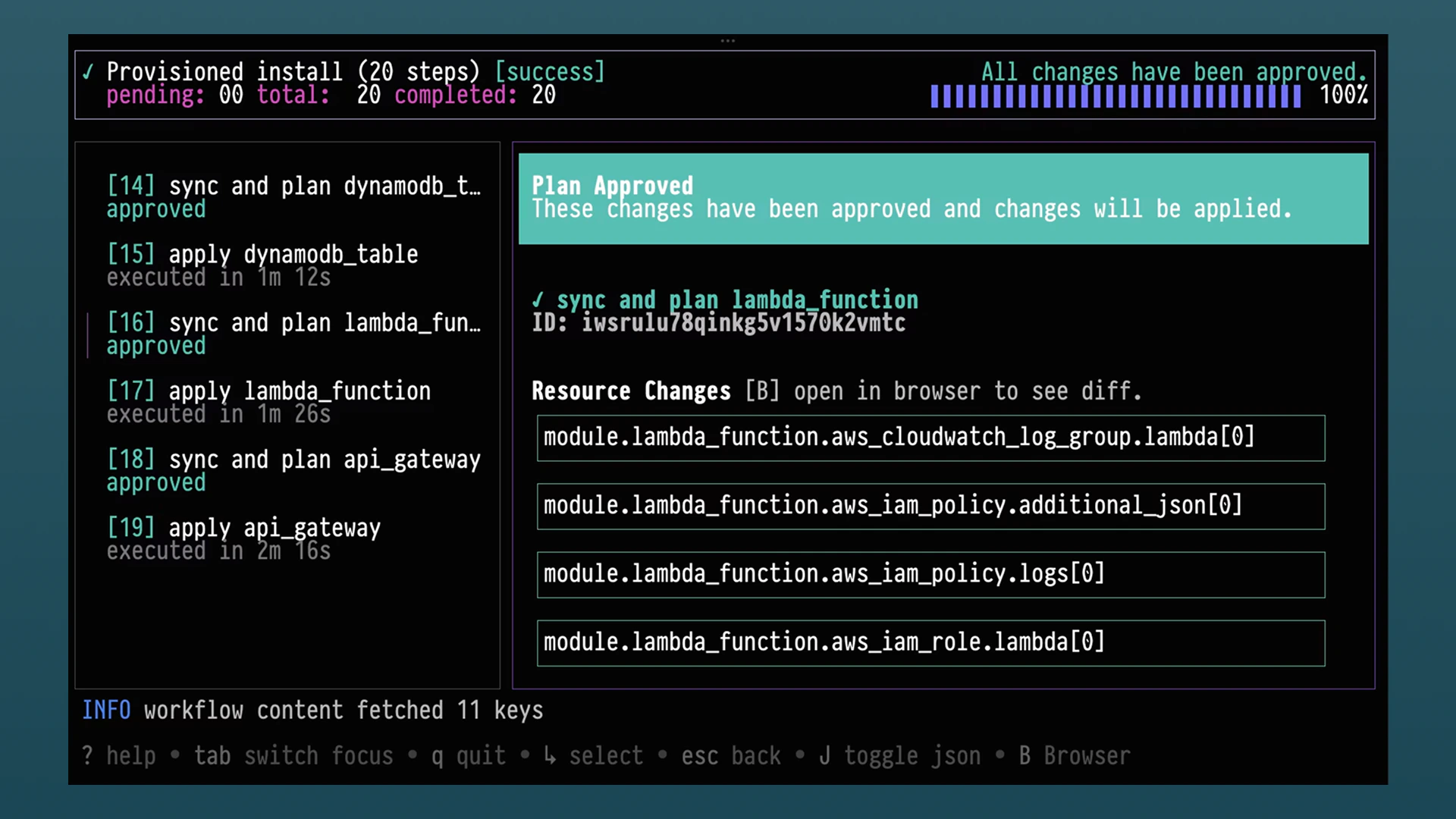
Install lifecycle events run as [workflows](/concepts/workflows). The CLI has an optional TUI that you can start with:
```bash theme={null}
nuon installs workflows
```
Or you can jump right into a specific install with:
```bash theme={null}
nuon installs workflows watch -i
```
 Or run the steps individually:
```bash theme={null}
nuon installs workflows list -i
nuon installs workflows steps approve -i --workflow-id --step-id
nuon installs workflows steps reject -i --workflow-id --step-id
nuon installs workflows steps retry -i --workflow-id --step-id
```
### Reprovision, deprovision, forget
```bash theme={null}
nuon installs reprovision -i
nuon installs deprovision -i
nuon installs forget -i
```
`forget` removes an install from the control plane without running deprovision workflows. Reserve it for installs that are stuck in an unrecoverable state.
## Extend the CLI
The CLI is extensible — you can publish your own `nuon ` commands that ship alongside install management. For how to build, distribute, and auth custom commands, see the [CLI Extensions guide](/guides/cli-extensions).
## Command reference
For the complete command list and every flag, run:
```bash theme={null}
nuon installs --help
```
Or run the steps individually:
```bash theme={null}
nuon installs workflows list -i
nuon installs workflows steps approve -i --workflow-id --step-id
nuon installs workflows steps reject -i --workflow-id --step-id
nuon installs workflows steps retry -i --workflow-id --step-id
```
### Reprovision, deprovision, forget
```bash theme={null}
nuon installs reprovision -i
nuon installs deprovision -i
nuon installs forget -i
```
`forget` removes an install from the control plane without running deprovision workflows. Reserve it for installs that are stuck in an unrecoverable state.
## Extend the CLI
The CLI is extensible — you can publish your own `nuon ` commands that ship alongside install management. For how to build, distribute, and auth custom commands, see the [CLI Extensions guide](/guides/cli-extensions).
## Command reference
For the complete command list and every flag, run:
```bash theme={null}
nuon installs --help
```