> ## Documentation Index
> Fetch the complete documentation index at: https://docs.nuon.co/llms.txt
> Use this file to discover all available pages before exploring further.
# Policies
> Enforce compliance, security, and operational standards across your infrastructure deployments.
Policies allow you to enforce compliance, security, and operational standards across your infrastructure deployments. Policies are evaluated during builds and deploys, blocking or warning when violations are detected.
## What are Policies?
Policies are rules written in [OPA Rego](https://www.openpolicyagent.org/docs/latest/policy-language/) or [Kyverno](https://kyverno.io/) that validate your infrastructure before deployment. Each policy can either:
* **Deny** - Block the build or deployment when a violation is detected
* **Warn** - Log a warning but allow the build or deployment to continue
Policies are evaluated at different phases depending on the component type:
* **Build-time**: Policies run during the component build process
* **Deploy-time**: Policies run after the plan is generated, before applying changes
* **Sandbox runs**: Policies run during sandbox infrastructure provisioning
## Policy Types
Nuon supports policies for different component types, each with its own input format:
| Type | Applies To | Engine | Evaluation Phase | Input Format |
| --------------------- | ------------------------------ | ------- | ---------------- | ----------------------------------------------- |
| `container_image` | External container images | OPA | Build | Image metadata (SBOM, signatures, attestations) |
| `helm_chart` | Helm chart components | OPA | Deploy | Kubernetes AdmissionReview |
| `kubernetes_manifest` | Kubernetes manifest components | OPA | Deploy | Kubernetes AdmissionReview |
| `terraform_module` | Terraform module components | OPA | Deploy | Terraform JSON plan |
| `kubernetes_cluster` | Kubernetes cluster resources | Kyverno | Deploy | Kubernetes resources |
| `sandbox` | Sandbox infrastructure | OPA | Sandbox run | Terraform JSON plan |
## Policy Engines
### OPA (Open Policy Agent)
OPA policies are written in [Rego](https://www.openpolicyagent.org/docs/latest/policy-language/), a declarative query language. Policies must be in the `nuon` package and use `deny` or `warn` rules.
The input structure varies by policy type:
| Policy Type | Input Structure |
| ----------------------------------- | ------------------------------------------------------------- |
| `terraform_module`, `sandbox` | `input.plan.resource_changes`, `input.plan.terraform_version` |
| `helm_chart`, `kubernetes_manifest` | `input.review.object`, `input.review.kind` |
| `container_image` | `input.image`, `input.tag`, `input.metadata` |
**Example: Terraform policy**
```rego theme={null}
package nuon
# Deny unencrypted S3 buckets
deny contains msg if {
some resource in input.plan.resource_changes
resource.type == "aws_s3_bucket"
resource.change.actions[_] in ["create", "update"]
not resource.change.after.server_side_encryption_configuration
msg := sprintf("S3 bucket '%s' must have encryption enabled", [resource.address])
}
# Warn about missing tags
warn contains msg if {
some resource in input.plan.resource_changes
resource.change.actions[_] in ["create", "update"]
not resource.change.after.tags.Environment
msg := sprintf("Resource '%s' is missing Environment tag", [resource.address])
}
```
**Example: Kubernetes/Helm policy**
```rego theme={null}
package nuon
# Deny containers running as root
deny contains msg if {
input.review.kind.kind == "Pod"
some container in input.review.object.spec.containers
container.securityContext.runAsUser == 0
msg := sprintf("Container '%s' must not run as root", [container.name])
}
```
**Example: Container image policy**
```rego theme={null}
package nuon
# Deny unsigned images
deny contains msg if {
not input.metadata.signed
msg := sprintf("Image %s:%s must be signed", [input.image, input.tag])
}
```
### Kyverno
Kyverno policies use YAML syntax and are designed for Kubernetes resources. Kyverno is only supported for `kubernetes_cluster` policy types:
```yaml theme={null}
apiVersion: kyverno.io/v1
kind: ClusterPolicy
metadata:
name: require-labels
spec:
validationFailureAction: Enforce
rules:
- name: check-team-label
match:
any:
- resources:
kinds:
- Pod
validate:
message: "All pods must have a 'team' label"
pattern:
metadata:
labels:
team: "?*"
```
## How do you configure Policies?
Policies are part of your app configuration. To create or update policies, add them to your app config and sync:
```sh theme={null}
nuon apps sync
```
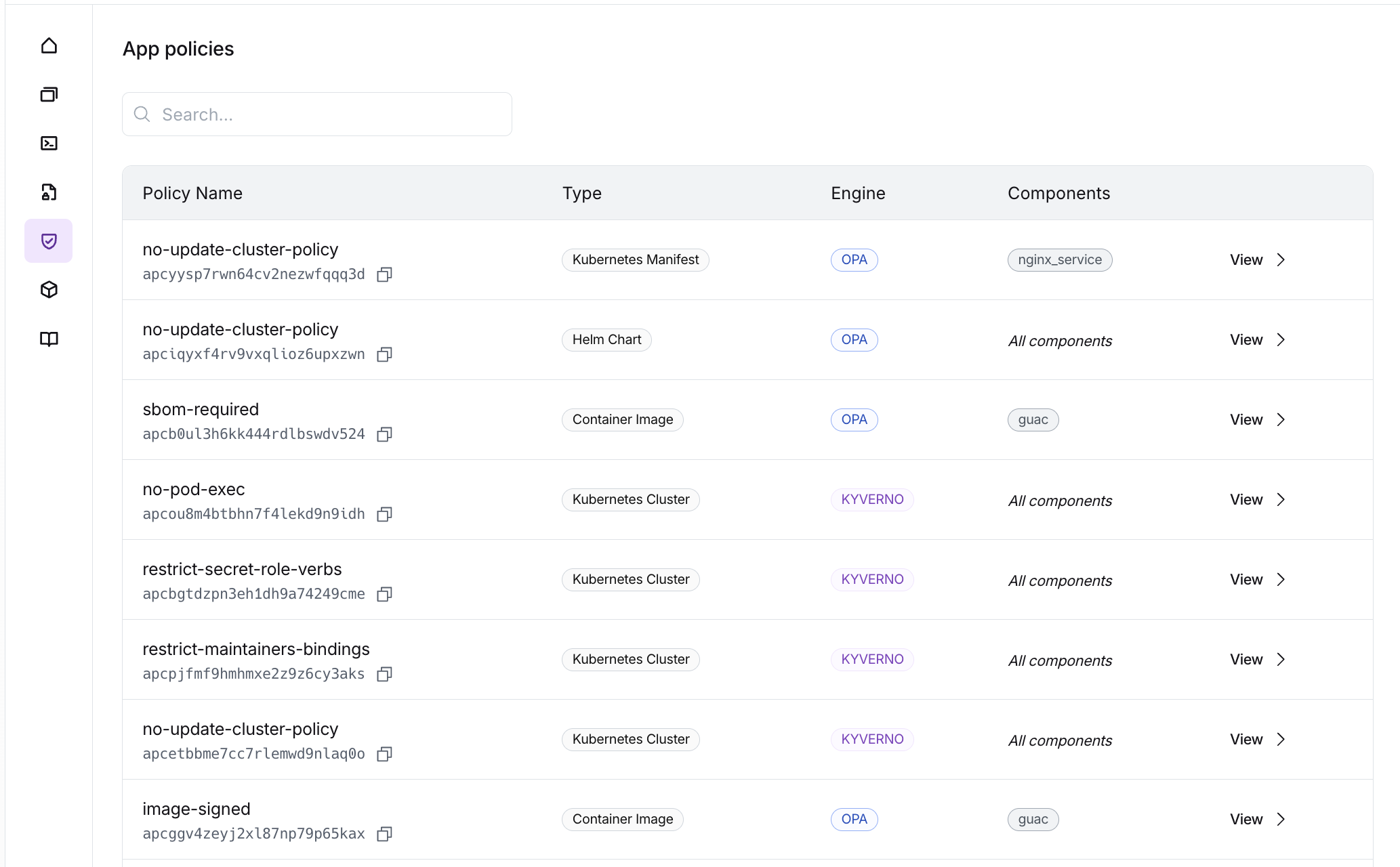 Please go through the [Configuring Policies guide](/guides/configuring-policies) for details.
Note that unlike components, policies do not need to be built, they are evaluated directly during build and deploy workflows.
## Policy Reports
### Build-Time Evaluation
Build-time policies are evaluated during the component build process:
* **`container_image`**: Policies evaluate image metadata (SBOM, signatures, attestations) fetched from the registry
If a `deny` rule matches during build-time evaluation, the build fails with status `policy_failed`.
### Deploy-Time Evaluation
Deploy-time policies are evaluated after the plan is generated, before applying changes:
* **`terraform_module`**: Policies evaluate the Terraform JSON plan
* **`helm_chart`**: Policies evaluate the Kubernetes AdmissionReview objects
* **`kubernetes_manifest`**: Policies evaluate the Kubernetes AdmissionReview objects
If a `deny` rule matches during deploy-time evaluation, the workflow step fails and changes are not applied.
### Sandbox Evaluation
Sandbox policies (`type = "sandbox"`) are evaluated during sandbox infrastructure runs. They receive the Terraform JSON plan for the sandbox infrastructure.
## Viewing Policy Results
### Dashboard
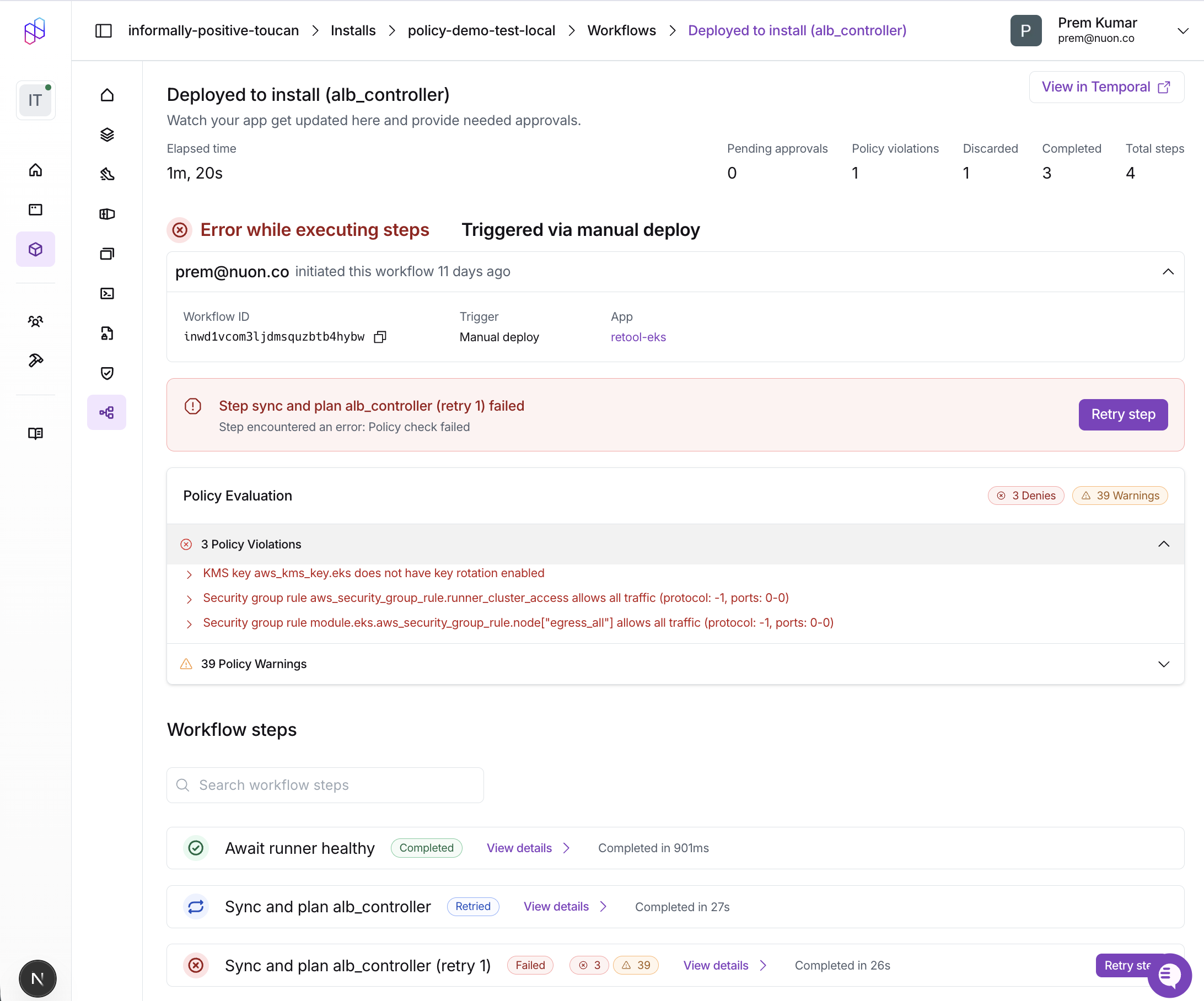
Policy violations are displayed in the workflow step details. The Policy Report card shows:
* **Passed**: All policy checks passed successfully
* **Denies**: Policy violations that blocked the workflow (red)
* **Warnings**: Policy warnings that were logged but didn't block (orange)
Each violation includes the policy name and the specific message from your `deny` or `warn` rule.
Please go through the [Configuring Policies guide](/guides/configuring-policies) for details.
Note that unlike components, policies do not need to be built, they are evaluated directly during build and deploy workflows.
## Policy Reports
### Build-Time Evaluation
Build-time policies are evaluated during the component build process:
* **`container_image`**: Policies evaluate image metadata (SBOM, signatures, attestations) fetched from the registry
If a `deny` rule matches during build-time evaluation, the build fails with status `policy_failed`.
### Deploy-Time Evaluation
Deploy-time policies are evaluated after the plan is generated, before applying changes:
* **`terraform_module`**: Policies evaluate the Terraform JSON plan
* **`helm_chart`**: Policies evaluate the Kubernetes AdmissionReview objects
* **`kubernetes_manifest`**: Policies evaluate the Kubernetes AdmissionReview objects
If a `deny` rule matches during deploy-time evaluation, the workflow step fails and changes are not applied.
### Sandbox Evaluation
Sandbox policies (`type = "sandbox"`) are evaluated during sandbox infrastructure runs. They receive the Terraform JSON plan for the sandbox infrastructure.
## Viewing Policy Results
### Dashboard
Policy violations are displayed in the workflow step details. The Policy Report card shows:
* **Passed**: All policy checks passed successfully
* **Denies**: Policy violations that blocked the workflow (red)
* **Warnings**: Policy warnings that were logged but didn't block (orange)
Each violation includes the policy name and the specific message from your `deny` or `warn` rule.
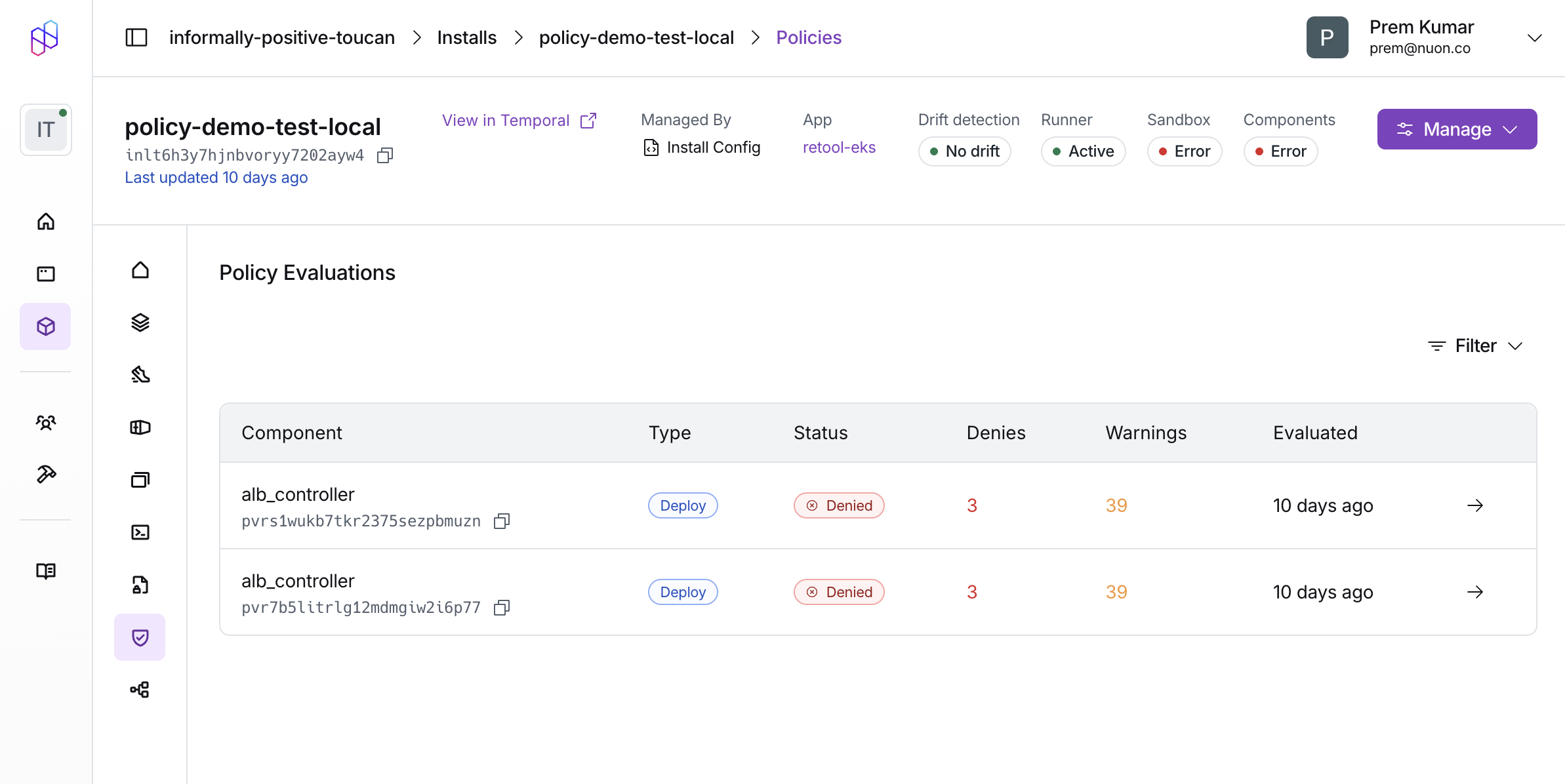
 You can also view a list of all policy reports for an install, or filter by their status, type etc.
 ### CLI
Build failures due to policy violations show the `policy_failed` status:
```sh theme={null}
nuon builds create -c my-component
# Output:
# ✗ component build failed policy check: Image nginx:latest must be signed
```
Workflow steps display policy violation counts in the output:
```sh theme={null}
nuon installs workflows steps list -w
# Output shows policy column with ✗ (denies) and ⚠ (warnings):
# Step Status Policy
# deploy-api error ✗ 2
# deploy-db success ✓
# deploy-cache success ⚠ 1
```
Get detailed violation messages for a specific step:
```sh theme={null}
nuon installs workflows steps get -w -s
```
## Policy Examples
We maintain a [collection of example policies](https://github.com/nuonco/policies)
organized by component type to help you get started.
The example repository includes:
* **`terraform/`** - Policies for Terraform modules (encryption, tagging, IAM security, cost controls)
* **`kubernetes/`** - Policies for Helm charts and Kubernetes manifests (pod security, resource limits, networking)
## Related Resources
* [External Image Policies Guide](/guides/external-image-policies) - Detailed reference for container image metadata and Rego patterns
* [Policies Configuration Reference](/config-ref/policies) - Schema reference for policy configuration
* [Example Policies Repository](https://github.com/nuonco/policies) - Ready-to-use policy examples
### CLI
Build failures due to policy violations show the `policy_failed` status:
```sh theme={null}
nuon builds create -c my-component
# Output:
# ✗ component build failed policy check: Image nginx:latest must be signed
```
Workflow steps display policy violation counts in the output:
```sh theme={null}
nuon installs workflows steps list -w
# Output shows policy column with ✗ (denies) and ⚠ (warnings):
# Step Status Policy
# deploy-api error ✗ 2
# deploy-db success ✓
# deploy-cache success ⚠ 1
```
Get detailed violation messages for a specific step:
```sh theme={null}
nuon installs workflows steps get -w -s
```
## Policy Examples
We maintain a [collection of example policies](https://github.com/nuonco/policies)
organized by component type to help you get started.
The example repository includes:
* **`terraform/`** - Policies for Terraform modules (encryption, tagging, IAM security, cost controls)
* **`kubernetes/`** - Policies for Helm charts and Kubernetes manifests (pod security, resource limits, networking)
## Related Resources
* [External Image Policies Guide](/guides/external-image-policies) - Detailed reference for container image metadata and Rego patterns
* [Policies Configuration Reference](/config-ref/policies) - Schema reference for policy configuration
* [Example Policies Repository](https://github.com/nuonco/policies) - Ready-to-use policy examples