> ## Documentation Index
> Fetch the complete documentation index at: https://docs.nuon.co/llms.txt
> Use this file to discover all available pages before exploring further.
# Roll Out a Change with an App Branch
> Sync the eks-simple example app's built-in branch config, then plan and deploy a change across its installs.
This walkthrough builds on the [`eks-simple`
directory](https://github.com/nuonco/example-app-configs/tree/main/eks-simple) of the example-app-configs
repository, which now ships a `branch.toml`.
[App branches](/concepts/app-branches) turn a change to your app config into a single, reviewable rollout across your
installs. `eks-simple` already ships its branch config. This walkthrough syncs it into your org and takes a change
through it end to end: preview the diff, plan each deployment group, approve, deploy.
## Prerequisites
* Finish [Create an AWS EKS App](/get-started/app-aws-k8s) first, or otherwise have the `eks-simple` app synced to
Nuon with **at least one install** that has finished provisioning.
* The [Nuon CLI](/cli), authenticated with `nuon auth login` and pointed at your org with `nuon orgs select`.
* A clone of [`example-app-configs`](https://github.com/nuonco/example-app-configs).
## What You Will Create
* An [app branch](/concepts/app-branches) named `main` **in your org**, created by syncing the branch config that
ships in the `eks-simple` directory of the example repository.
* Two [deployment groups](/concepts/app-branches#deployment-groups) named `stage` and `production`, which select
their installs by label.
* A labeled install, so it lands in the `stage` group.
* A plan-only preview run, and then a real run you approve group by group.
## Review the Branch Config
### `branch.toml`
The branch config is a single file at the root of the app config directory, alongside `metadata.toml`. `eks-simple`
already includes it — open
[`eks-simple/branch.toml`](https://github.com/nuonco/example-app-configs/blob/main/eks-simple/branch.toml) in your
clone and read it against what follows:
```toml branch.toml theme={null}
name = "main"
[public_repo]
directory = "eks-simple"
repo = "nuonco/example-app-configs"
branch = "main"
[[install_groups]]
name = "stage"
order = 1
[install_groups.label_selector]
env = "stage"
[[install_groups]]
name = "production"
order = 2
[install_groups.label_selector]
env = "prod"
```
Reading it top to bottom:
* **`name = "main"`** is the branch's name in Nuon. It comes from this key, not from the filename, and it is what you
pass to `nuon sync --branch`.
* **`[public_repo]`** is the repository the branch tracks. `directory` is the path to the app config inside that repo,
so `eks-simple` here rather than `"."`. All three fields are required.
* **Two `[[install_groups]]`** — `stage` first (`order = 1`), then `production` (`order = 2`). Lower `order` deploys
first, and each group's plan waits for your approval before its deploy runs.
* **`[install_groups.label_selector]`** picks each group's installs by label. An install labeled `env = "stage"` is in
the `stage` group; one labeled `env = "prod"` is in `production`. Nothing is hard-coded to a particular install, so
adding a customer to a group is a matter of labeling it.
Both groups use `label_selector` rather than `install_names` on purpose. Names are resolved to install IDs when you
sync and an unknown name fails the whole sync, so a name-based group breaks in any org where that install does not
exist. Label selectors re-evaluate on every run.
### Label your install
The `stage` group is empty until an install carries `env = "stage"`. Label the install you provisioned earlier:
```sh theme={null}
nuon installs labels set --install-id env=stage
```
Then confirm the selector matches it:
```sh theme={null}
nuon installs list --labels env=stage
```
The example app also declares its CI installs as tracked config files, and sets the labels there instead:
```toml installs/eks-simple-ci-stage.toml theme={null}
#:schema https://api.nuon.co/v1/general/config-schema?type=install
name = "eks-simple-ci-stage"
[labels]
env = "stage"
approval_option = "approve-all"
[aws_account]
region = "us-east-1"
[[inputs]]
domain = "nuon.run"
sub_domain = "whoami"
```
Either route sets the same label. Install config files have their own sync command, separate from `nuon apps sync`:
```sh theme={null}
nuon installs sync -a -d installs/
```
Managing labels in the files means group membership is version-controlled along with everything else about the
install.
### Sync the app
From the `eks-simple` directory (start in the directory where you cloned `example-app-configs`):
```sh theme={null}
cd example-app-configs/eks-simple
nuon apps select # no flags: pick eks-simple from the list
nuon apps sync
```
The sync creates the branch and its two deployment groups. Check what Nuon now has:
```sh theme={null}
nuon apps list # prints each app's name and ID
nuon apps branches list --app-id
```
Branch commands take the app **ID** (`app...`) — copy it from `nuon apps list`. Selecting the app with
`nuon apps select` (no flags, pick from the list) stores it once, which is what lets the rest of this walkthrough
drop `--app-id` from `trigger` and `runs`.
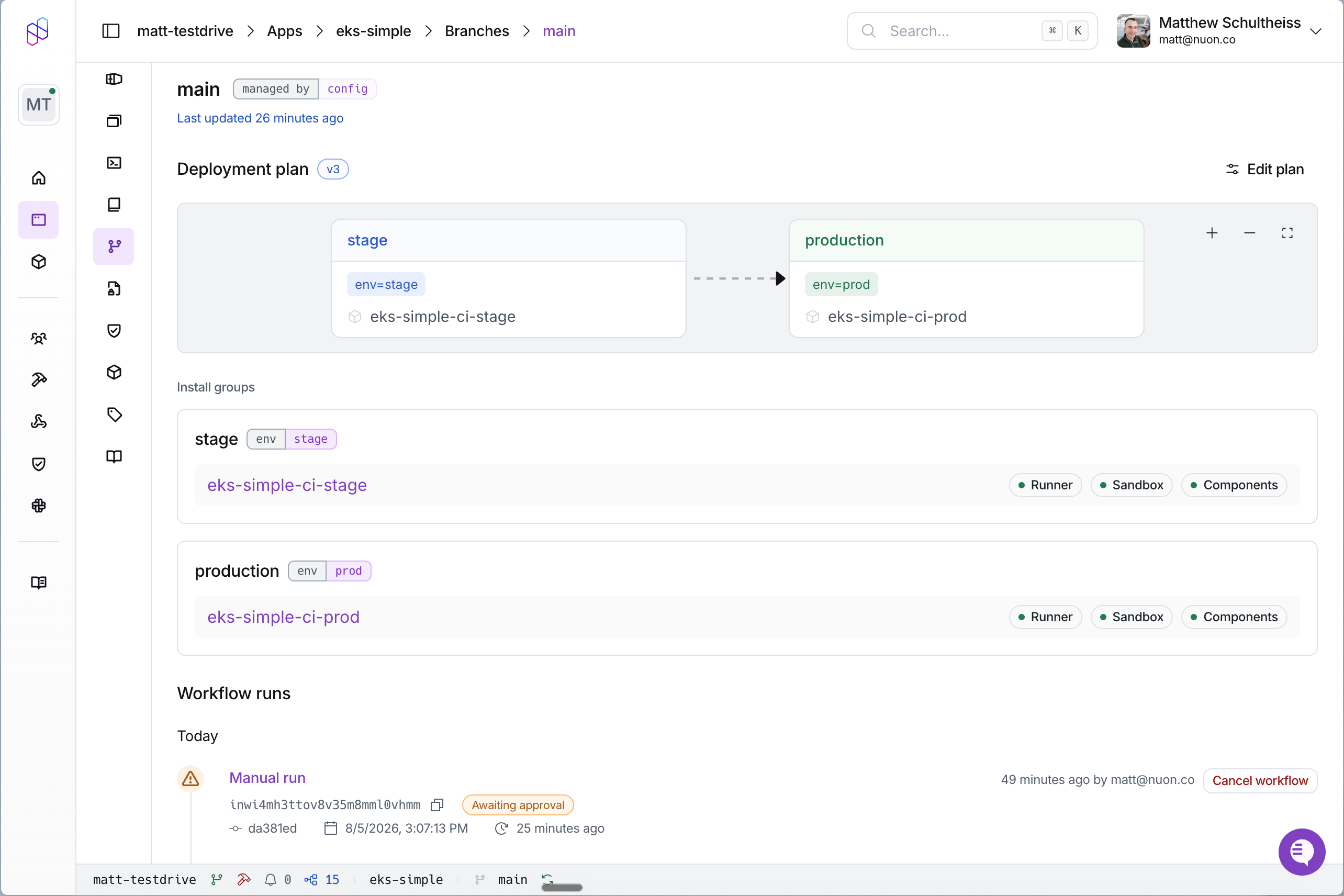
You should see one branch, `main`. In the dashboard, the app now has a **Branches** view showing the branch and its
**Deployment plan**: `stage`, then `production`.
 ## Preview a Change
Before deploying anything, see what a change would do. Edit the `sub_domain` input default in `inputs.toml` (this is
an excerpt — leave the rest of the file as it is):
```toml inputs.toml (excerpt) theme={null}
[[input]]
name = "sub_domain"
description = "The sub domain for the Whoami service"
default = "hello"
display_name = "Sub Domain"
group = "dns"
```
A changed **default** only shows up in the diff for installs that inherit it. An install that sets `sub_domain`
explicitly (including `eks-simple-ci-stage`, whose config file pins it) shows an empty diff for this change. To
see the diff on every install, change something unconditional instead, or remove the explicit value from your
install first.
Then run a plan-only preview against your local files:
```sh theme={null}
nuon sync --branch main --preview
```
This syncs the config in the current directory and triggers a **plan-only** run for it. Nothing is applied to any
install. The command prints the run's ID and returns; watch the run in the dashboard, or with
`nuon apps branches runs --app-id --branch-id main`, which opens the workflow TUI.
A manual plan-only run still walks the deployment groups: it creates each group's `plan install group` and
`deploy install group` step, but each approval gate **auto-approves** ("Auto-approved in plan-only mode") and
nothing is applied, so the run finishes on its own. Read the per-install diffs from the completed run. (A pull
request preview behaves differently and never creates the group steps at all.)
`nuon sync --branch` runs against your local working directory, including uncommitted edits. That makes it the fast
way to iterate on a change before you commit it. Note the flag lives on `nuon sync`, not `nuon apps sync`.
## Run It for Real
Drop the `--preview` and the same command becomes a real rollout:
```sh theme={null}
nuon sync --branch main
```
Or trigger a run from the branch's committed config, with no local sync at all:
```sh theme={null}
nuon apps branches trigger --branch-id main
```
Both walk the same deployment groups, but their first two steps differ, because `nuon sync --branch` hands Nuon a
config it already built from your working directory while `trigger` fetches one from git:
| Step | `nuon sync --branch main` | `nuon apps branches trigger` |
| ---- | ---------------------------------- | ---------------------------------- |
| 1 | `fetch commit (skipped)` | `fetch commit` |
| 2 | `fetch app config (skipped)` | `fetch app config` |
| 3 | `building components and sandbox` | `building components and sandbox` |
| 4 | `plan install group: stage` | `plan install group: stage` |
| 5 | `deploy install group: stage` | `deploy install group: stage` |
| 6 | `plan install group: production` | `plan install group: production` |
| 7 | `deploy install group: production` | `deploy install group: production` |
From step 3 on they are identical:
* `building components and sandbox` rebuilds only what changed.
* each `plan install group` computes the diff for every install in the group and then **waits** for you.
* each `deploy install group` runs once you approve the plan before it.
### Approve the plan
The run pauses at `plan install group: stage`. In the diff, installs that inherit the default show `sub_domain`
moving from `whoami` to `hello`; installs that pin `sub_domain` explicitly show no change for it (see the note in
Preview a Change). Approve the plan and the group deploys.
The run then stops at `plan install group: production`. A group with no matching installs still pauses; **Skip
install group** moves the run past it.
Every group's plan waits for an approval, from the dashboard or an API caller. There is no setting that
auto-approves a deployment group.
### Watch runs from the CLI
```sh theme={null}
nuon apps branches runs --branch-id main
```
This lists the branch's runs and opens the one you pick in the workflow TUI.
## Trigger From a Git Push
So far every run has been triggered by hand, because `branch.toml` tracks `nuonco/example-app-configs`, a repository
you cannot push to. To get the push-triggered behavior, point the branch at a repository of your own.
Fork `example-app-configs`, or copy the `eks-simple` directory into a repository you control.
Connect the Nuon GitHub App for your repository's owner (see [connecting a repository](/guides/vcs)). This is what
makes pull request previews possible. It is an org-level connection keyed on the owner, so it enables previews for
any branch tracking a repo under that owner, whether the branch config uses `[connected_repo]` or `[public_repo]`.
Swap `[public_repo]` for `[connected_repo]`, pointing at your repository and the directory the config lives in:
```toml branch.toml theme={null}
name = "main"
[connected_repo]
directory = "eks-simple"
repo = "your-org/example-app-configs"
branch = "main"
[[install_groups]]
name = "stage"
order = 1
[install_groups.label_selector]
env = "stage"
[[install_groups]]
name = "production"
order = 2
[install_groups.label_selector]
env = "prod"
```
```sh theme={null}
nuon apps sync
git commit -am "point app branch at my repo"
git push origin main
```
The push starts a run on its own. From here on, a commit to `main` is the trigger, with no CLI step in between.
Open a pull request against `main` with a config change in it. Nuon runs a plan-only preview and posts a comment
headed `## Nuon Preview — main` (the branch's `name`, not the app's) with a table of what changed, plus a
`nuon/preview` commit status. Push another commit and the same comment is updated in place.
## Inspect the History
Every config change to an install is recorded as an app config version. Open the install in the dashboard and look at
its **Versions** view, or list them over the API (create an API token in the dashboard's org settings; the install ID
comes from `nuon installs list`):
```sh theme={null}
curl -H "Authorization: Bearer $NUON_API_TOKEN" \
-H "X-Nuon-Org-ID: $NUON_ORG_ID" \
"https://api.nuon.co/v1/installs/$INSTALL_ID/app-config-versions"
```
Any earlier version can be applied again, which is the path back if a change turns out badly. The guide walks through
[rolling back to a previous version](/guides/rollback-install-config).
## Wrapping Up and Next Steps
You now have a git branch wired to a fleet: a change to the config produces a build, a diff per install, and an
approval gate in front of each group.
Where to go next:
Multiple branches, label-driven groups, and the full command reference.
Run types, previews, and version history in depth.
Every field on `branch.toml`.
Have your own systems react to branch runs.
## Preview a Change
Before deploying anything, see what a change would do. Edit the `sub_domain` input default in `inputs.toml` (this is
an excerpt — leave the rest of the file as it is):
```toml inputs.toml (excerpt) theme={null}
[[input]]
name = "sub_domain"
description = "The sub domain for the Whoami service"
default = "hello"
display_name = "Sub Domain"
group = "dns"
```
A changed **default** only shows up in the diff for installs that inherit it. An install that sets `sub_domain`
explicitly (including `eks-simple-ci-stage`, whose config file pins it) shows an empty diff for this change. To
see the diff on every install, change something unconditional instead, or remove the explicit value from your
install first.
Then run a plan-only preview against your local files:
```sh theme={null}
nuon sync --branch main --preview
```
This syncs the config in the current directory and triggers a **plan-only** run for it. Nothing is applied to any
install. The command prints the run's ID and returns; watch the run in the dashboard, or with
`nuon apps branches runs --app-id --branch-id main`, which opens the workflow TUI.
A manual plan-only run still walks the deployment groups: it creates each group's `plan install group` and
`deploy install group` step, but each approval gate **auto-approves** ("Auto-approved in plan-only mode") and
nothing is applied, so the run finishes on its own. Read the per-install diffs from the completed run. (A pull
request preview behaves differently and never creates the group steps at all.)
`nuon sync --branch` runs against your local working directory, including uncommitted edits. That makes it the fast
way to iterate on a change before you commit it. Note the flag lives on `nuon sync`, not `nuon apps sync`.
## Run It for Real
Drop the `--preview` and the same command becomes a real rollout:
```sh theme={null}
nuon sync --branch main
```
Or trigger a run from the branch's committed config, with no local sync at all:
```sh theme={null}
nuon apps branches trigger --branch-id main
```
Both walk the same deployment groups, but their first two steps differ, because `nuon sync --branch` hands Nuon a
config it already built from your working directory while `trigger` fetches one from git:
| Step | `nuon sync --branch main` | `nuon apps branches trigger` |
| ---- | ---------------------------------- | ---------------------------------- |
| 1 | `fetch commit (skipped)` | `fetch commit` |
| 2 | `fetch app config (skipped)` | `fetch app config` |
| 3 | `building components and sandbox` | `building components and sandbox` |
| 4 | `plan install group: stage` | `plan install group: stage` |
| 5 | `deploy install group: stage` | `deploy install group: stage` |
| 6 | `plan install group: production` | `plan install group: production` |
| 7 | `deploy install group: production` | `deploy install group: production` |
From step 3 on they are identical:
* `building components and sandbox` rebuilds only what changed.
* each `plan install group` computes the diff for every install in the group and then **waits** for you.
* each `deploy install group` runs once you approve the plan before it.
### Approve the plan
The run pauses at `plan install group: stage`. In the diff, installs that inherit the default show `sub_domain`
moving from `whoami` to `hello`; installs that pin `sub_domain` explicitly show no change for it (see the note in
Preview a Change). Approve the plan and the group deploys.
The run then stops at `plan install group: production`. A group with no matching installs still pauses; **Skip
install group** moves the run past it.
Every group's plan waits for an approval, from the dashboard or an API caller. There is no setting that
auto-approves a deployment group.
### Watch runs from the CLI
```sh theme={null}
nuon apps branches runs --branch-id main
```
This lists the branch's runs and opens the one you pick in the workflow TUI.
## Trigger From a Git Push
So far every run has been triggered by hand, because `branch.toml` tracks `nuonco/example-app-configs`, a repository
you cannot push to. To get the push-triggered behavior, point the branch at a repository of your own.
Fork `example-app-configs`, or copy the `eks-simple` directory into a repository you control.
Connect the Nuon GitHub App for your repository's owner (see [connecting a repository](/guides/vcs)). This is what
makes pull request previews possible. It is an org-level connection keyed on the owner, so it enables previews for
any branch tracking a repo under that owner, whether the branch config uses `[connected_repo]` or `[public_repo]`.
Swap `[public_repo]` for `[connected_repo]`, pointing at your repository and the directory the config lives in:
```toml branch.toml theme={null}
name = "main"
[connected_repo]
directory = "eks-simple"
repo = "your-org/example-app-configs"
branch = "main"
[[install_groups]]
name = "stage"
order = 1
[install_groups.label_selector]
env = "stage"
[[install_groups]]
name = "production"
order = 2
[install_groups.label_selector]
env = "prod"
```
```sh theme={null}
nuon apps sync
git commit -am "point app branch at my repo"
git push origin main
```
The push starts a run on its own. From here on, a commit to `main` is the trigger, with no CLI step in between.
Open a pull request against `main` with a config change in it. Nuon runs a plan-only preview and posts a comment
headed `## Nuon Preview — main` (the branch's `name`, not the app's) with a table of what changed, plus a
`nuon/preview` commit status. Push another commit and the same comment is updated in place.
## Inspect the History
Every config change to an install is recorded as an app config version. Open the install in the dashboard and look at
its **Versions** view, or list them over the API (create an API token in the dashboard's org settings; the install ID
comes from `nuon installs list`):
```sh theme={null}
curl -H "Authorization: Bearer $NUON_API_TOKEN" \
-H "X-Nuon-Org-ID: $NUON_ORG_ID" \
"https://api.nuon.co/v1/installs/$INSTALL_ID/app-config-versions"
```
Any earlier version can be applied again, which is the path back if a change turns out badly. The guide walks through
[rolling back to a previous version](/guides/rollback-install-config).
## Wrapping Up and Next Steps
You now have a git branch wired to a fleet: a change to the config produces a build, a diff per install, and an
approval gate in front of each group.
Where to go next:
Multiple branches, label-driven groups, and the full command reference.
Run types, previews, and version history in depth.
Every field on `branch.toml`.
Have your own systems react to branch runs.