> ## Documentation Index
> Fetch the complete documentation index at: https://docs.nuon.co/llms.txt
> Use this file to discover all available pages before exploring further.
# Configure app branches
> Connect a git branch to your app, group your installs, and roll changes out across your fleet from a git push.
This guide walks through setting up an [app branch](/concepts/app-branches) on an existing app: writing the branch
config, sorting your installs into deployment groups, triggering runs, and approving
them.
## Prerequisites
* An [app](/concepts/apps) already synced to Nuon, with at least one install.
* The [Nuon CLI](/cli) installed and authenticated (`nuon auth login`).
* For pull request previews, the **Nuon GitHub App connected in your org for the repository's owner**. See
[connecting a repository](/guides/vcs).
Every branch of a given app must point at the same repository, and an install can belong to only one branch at a
time. See [rules and limits](/concepts/app-branches#rules-and-limits) before you plan more than one branch.
## Write a branch config
Add a `branch.toml` file to the root of your app config directory, next to `metadata.toml`. It declares the branch
name, the repo and branch to track, and the deployment groups the rollout moves through.
```toml branch.toml theme={null}
name = "main"
[connected_repo]
repo = "acmeco/my-app-config"
directory = "."
branch = "main"
[[install_groups]]
name = "staging"
order = 1
[install_groups.label_selector]
env = "staging"
[[install_groups]]
name = "production"
order = 2
[install_groups.label_selector]
env = "prod"
```
Three things to get right:
* **The repo block.** Use `[connected_repo]` for a repository connected through the Nuon GitHub App, or
`[public_repo]` for a public one. Exactly one of the two, and `repo`, `directory`, and `branch` are all required.
`directory` is the path to your app config within the repo, or `"."` if it is at the root.
* **`name`** is the branch's name in Nuon, and it comes from this key, not from the filename. It is what you pass to
`nuon sync --branch`.
* **Group order.** `order` decides which group deploys first, lowest first. List your groups in the order you want
them to run.
Every branch needs one of `[connected_repo]` or `[public_repo]`: the repo block is what the deployment groups sync
against.
Every field is documented in the [branch config reference](/config-ref/branch).
### Selecting installs for a group
Each group picks its installs one of two ways: a `label_selector`, or an explicit list (`install_ids` and
`install_names`, which may be combined; names resolve to IDs at sync time). A label selector cannot be combined with
an explicit list in the same group:
```toml theme={null}
# Recommended: matches any install carrying all of these labels.
[[install_groups]]
name = "production"
order = 2
[install_groups.label_selector]
env = "prod"
tier = "enterprise"
```
```toml theme={null}
# Explicit names, resolved to install IDs when you sync.
[[install_groups]]
name = "pilot"
order = 1
install_names = ["customer-acme"]
```
```toml theme={null}
# Explicit IDs.
[[install_groups]]
name = "pilot"
order = 1
install_ids = ["inlbmky2fz8qvrxp3d7twahjc9"]
```
Prefer `label_selector`: it re-evaluates on every run, so group membership follows your labels with no re-sync.
Explicit `install_names` are resolved to IDs once, at sync time.
### One branch or several
Two layouts are supported, and they are mutually exclusive:
* **`branch.toml`**: a single branch. This is what most apps want, and what the rest of this guide assumes.
* **`branches/*.toml`**: one file per branch, for tracking several branches of the same repo (a `staging` branch and
a `main` branch, for example). The `name` key inside each file sets the branch name; the filename does not.
## Label your installs
A label selector only matches installs that actually carry the labels. Set them with the CLI:
```sh theme={null}
nuon installs labels set --install-id customer-acme env=prod tier=enterprise
```
Labels are key/value pairs, passed as positional `key=value` arguments. To inspect or remove them:
```sh theme={null}
nuon installs labels list --install-id customer-acme
nuon installs labels unset --install-id customer-acme tier
```
You can also confirm which installs a selector will match before you run anything:
```sh theme={null}
nuon installs list --labels env=prod --labels tier=enterprise --limit 200
```
All labels passed to `--labels` must match, so this is the same AND semantics a group's `label_selector` uses. On a
fleet of more than 20 installs, pass `--limit` at least your install count to list every match.
Prefer keeping labels in install config files (a `[labels]` table, one file per install) so they are reviewed like
the rest of your config, and apply them with `nuon installs sync -a -d installs/`. To start from an
install that already exists, export it: `nuon installs generate-config -i > installs/.toml`.
## Sync the branch config
Syncing your app config creates or updates the branch, along with its deployment groups:
```sh theme={null}
nuon apps sync
```
Branches are upserted by name and are never pruned. Removing a branch from your config does not delete it in Nuon.
Use `nuon apps branches delete` for that.
Confirm what Nuon now has:
```sh theme={null}
nuon apps list # find your app's ID
nuon apps branches list --app-id
nuon apps branches get --app-id --branch-id
```
`list` prints each branch's name and ID; `get` takes the branch ID and returns the full branch, deployment groups
included.
The `nuon apps branches` subcommands take the app **ID** (`app...`), which `nuon apps list` prints. Or select the
app once with `nuon apps select` (no flags, pick from the list) and omit `--app-id` wherever it is optional.
## Trigger a run
Once the branch exists, a push to the tracked branch is all it takes:
```sh theme={null}
git commit -am "bump chart version"
git push origin main
```
Nuon receives the push, and the run appears in the dashboard and in `nuon apps branches runs`.
You do not have to wait for a push, though. Two other ways to start a run, both using the app you selected with
`nuon apps select`:
```sh Trigger the committed config theme={null}
# Runs against the tracked branch's latest commit.
nuon apps branches trigger --branch-id main
# Plan only — plans every group, applies nothing.
nuon apps branches trigger --branch-id main --preview
# Rebuild every component instead of only what changed.
nuon apps branches trigger --branch-id main --force
```
```sh Sync local files, then run theme={null}
# Syncs the config in the current directory, then triggers a run for that config.
nuon sync --branch main
# Same, but plan-only.
nuon sync --branch main --preview
# Pick the branch interactively.
nuon sync --app-branch
```
Anything that can run the CLI or call the API can start the same run, which is how a CI job drives a rollout without
a webhook.
`--preview` on a manual run suppresses the **apply**, not the workflow. The run still creates
`plan install group: ` and `deploy install group: ` for every group, but each approval gate
auto-approves ("Auto-approved in plan-only mode") and nothing is applied — the run finishes on its own, and you read
the per-install diffs from the completed run. This differs from a pull request preview, which never creates the
group steps at all.
`nuon sync --branch` runs against your **local, uncommitted files**, not the tracked branch's commit — the right
tool for iterating on a change before pushing it. The `--branch`, `--app-branch`, and `--preview` flags live on
`nuon sync` (not `nuon apps sync`), and `--preview` takes effect alongside `--branch` or `--app-branch`.
Because `nuon sync --branch` hands Nuon a config it already built locally, that run's first two steps appear as
`fetch commit (skipped)` and `fetch app config (skipped)`. A run started from a push or from
`nuon apps branches trigger` fetches from git and shows both steps running.
`nuon apps branches trigger` and `nuon apps branches runs` open the full-screen workflow TUI, so you can watch steps
and approve from the terminal. See the [TUI reference](/tui).
## Approve or skip a deployment group
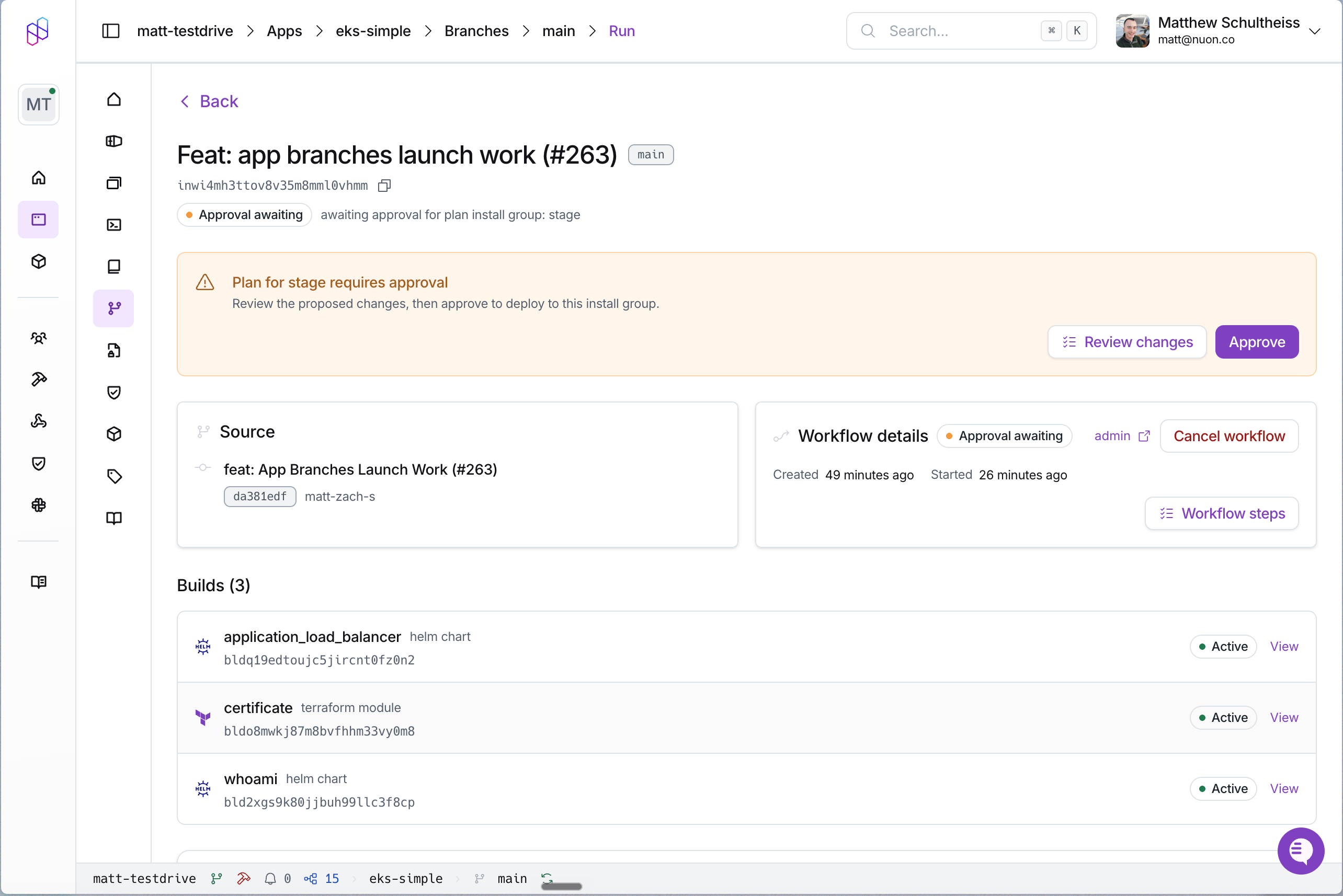
A run pauses at each group's plan step until someone acts on it. In the dashboard, open the app's **Branches** view,
then the run, and you will see the **Deployment plan** with each group's steps.
For each group:
* **Approve install group plan** — read the per-install diff, then approve to let the group's deploy step run.
* **Skip install group** — move the rollout past this group's deploy without applying it.
The run stops at the next group's plan step, so a multi-group rollout is a sequence of deliberate decisions rather
than one irreversible action.
 There is no setting that auto-approves a deployment group's plan. Each one needs a human in the dashboard or an API
caller. If you want a machine to advance a rollout, subscribe to the [webhook](/guides/webhooks) events for the run
and drive the approval through the API once your own checks pass.
## Set up pull request previews
There is nothing to configure on the branch itself. Opening a pull request against a tracked branch, or pushing
another commit to an open one, starts a plan-only run, and Nuon reports back on the pull request:
* a comment headed `## Nuon Preview — ` (the branch's `name`, so usually `main`) with a table of config
changes by section, edited in place on each later push rather than added to.
* a commit status with the context `nuon/preview`, moving from pending to success or failure.
If the pull request does not change the app config, the run stops early and the comment says so.
What previews *do* need is a **GitHub App connection in your org for the repository's owner**. Connect it once, from
[connecting a repository](/guides/vcs). After that, every branch tracking a repo under that owner gets previews. This
is an org-level setting, not a property of the branch config: a `[public_repo]` branch pointing at `acmeco/my-app` gets
previews just like a `[connected_repo]` one, provided your org has connected `acmeco`.
Previews start posting as soon as your org has the GitHub App connection for the repository's owner. If they have
not appeared yet, that connection is the thing to check — not your `branch.toml`.
To reproduce a preview locally before opening the pull request:
```sh theme={null}
nuon sync --branch main --preview
```
## Roll back when a change goes badly
Every config change to an install is recorded as an app config version, and any earlier version can be applied again,
to one install or to a whole deployment group, with a plan in front of it. The
[rollback guide](/guides/rollback-install-config) walks through the exact calls.
## Command reference
| Command | What it does |
| ---------------------------------------------------------------------------- | ------------------------------------------------------------------------------------- |
| `nuon apps branches list --app-id ` | List an app's branches. Alias: `nuon apps br`. |
| `nuon apps branches get --app-id --branch-id ` | Show a branch's details, including its deployment groups. Takes an ID, not a name. |
| `nuon apps branches create --app-id --name ` | Create a branch without syncing a config file. |
| `nuon apps branches trigger --branch-id ` | Trigger a run. `--preview` for plan-only, `--force` to rebuild everything. |
| `nuon apps branches runs --branch-id ` | List runs and open one in the workflow TUI. |
| `nuon apps branches delete --app-id --branch-id --confirm` | Delete a branch. |
| `nuon sync --branch ` | Sync the current directory, then trigger a run for it. Add `--preview` for plan-only. |
| `nuon sync --app-branch` | Same, choosing the branch interactively. |
| `nuon installs labels set --install-id k=v ...` | Set labels used by group selectors. |
| `nuon installs labels list --install-id ` | List an install's labels. |
| `nuon installs labels unset --install-id ...` | Remove labels. |
| `nuon installs list --labels k=v` | Preview which installs a selector matches. |
## Troubleshooting
**The branch synced but has no deployment groups.** The branch config is missing its `[connected_repo]` /
`[public_repo]` block. Add one and sync again.
**A push did not start a run.** Branch matching is on the exact repository and branch name. Check that the branch's
`branch` value matches the ref you pushed and that the repo is the one Nuon has connected. There are no path filters,
so a push that matches always starts a run. If nothing happened, the match itself failed.
**The pull request has no Nuon comment.** Your org has no GitHub App connection for that repository's owner. The
preview run itself succeeds and this is not reported as an error, so check the connection rather than the branch config.
Note this is about the *owner*, not the branch's repo block. A `[public_repo]` branch is fine if the owner is connected.
**A sync failed on an install name.** `install_names` must resolve to installs that exist in the org you are syncing
into. Switch the group to a `label_selector`, or create the install first.
**A group deployed to nothing.** No install carried the selector's labels. Check with
`nuon installs list --labels ...`.
## Next steps
Run types, plan and approval flow, and install version history.
Roll a change through the `eks-simple` example app end to end.
Re-apply a previous config version to an install or a whole group.
Every field on `branch.toml`.
React to branch runs from your own systems.
There is no setting that auto-approves a deployment group's plan. Each one needs a human in the dashboard or an API
caller. If you want a machine to advance a rollout, subscribe to the [webhook](/guides/webhooks) events for the run
and drive the approval through the API once your own checks pass.
## Set up pull request previews
There is nothing to configure on the branch itself. Opening a pull request against a tracked branch, or pushing
another commit to an open one, starts a plan-only run, and Nuon reports back on the pull request:
* a comment headed `## Nuon Preview — ` (the branch's `name`, so usually `main`) with a table of config
changes by section, edited in place on each later push rather than added to.
* a commit status with the context `nuon/preview`, moving from pending to success or failure.
If the pull request does not change the app config, the run stops early and the comment says so.
What previews *do* need is a **GitHub App connection in your org for the repository's owner**. Connect it once, from
[connecting a repository](/guides/vcs). After that, every branch tracking a repo under that owner gets previews. This
is an org-level setting, not a property of the branch config: a `[public_repo]` branch pointing at `acmeco/my-app` gets
previews just like a `[connected_repo]` one, provided your org has connected `acmeco`.
Previews start posting as soon as your org has the GitHub App connection for the repository's owner. If they have
not appeared yet, that connection is the thing to check — not your `branch.toml`.
To reproduce a preview locally before opening the pull request:
```sh theme={null}
nuon sync --branch main --preview
```
## Roll back when a change goes badly
Every config change to an install is recorded as an app config version, and any earlier version can be applied again,
to one install or to a whole deployment group, with a plan in front of it. The
[rollback guide](/guides/rollback-install-config) walks through the exact calls.
## Command reference
| Command | What it does |
| ---------------------------------------------------------------------------- | ------------------------------------------------------------------------------------- |
| `nuon apps branches list --app-id ` | List an app's branches. Alias: `nuon apps br`. |
| `nuon apps branches get --app-id --branch-id ` | Show a branch's details, including its deployment groups. Takes an ID, not a name. |
| `nuon apps branches create --app-id --name ` | Create a branch without syncing a config file. |
| `nuon apps branches trigger --branch-id ` | Trigger a run. `--preview` for plan-only, `--force` to rebuild everything. |
| `nuon apps branches runs --branch-id ` | List runs and open one in the workflow TUI. |
| `nuon apps branches delete --app-id --branch-id --confirm` | Delete a branch. |
| `nuon sync --branch ` | Sync the current directory, then trigger a run for it. Add `--preview` for plan-only. |
| `nuon sync --app-branch` | Same, choosing the branch interactively. |
| `nuon installs labels set --install-id k=v ...` | Set labels used by group selectors. |
| `nuon installs labels list --install-id ` | List an install's labels. |
| `nuon installs labels unset --install-id ...` | Remove labels. |
| `nuon installs list --labels k=v` | Preview which installs a selector matches. |
## Troubleshooting
**The branch synced but has no deployment groups.** The branch config is missing its `[connected_repo]` /
`[public_repo]` block. Add one and sync again.
**A push did not start a run.** Branch matching is on the exact repository and branch name. Check that the branch's
`branch` value matches the ref you pushed and that the repo is the one Nuon has connected. There are no path filters,
so a push that matches always starts a run. If nothing happened, the match itself failed.
**The pull request has no Nuon comment.** Your org has no GitHub App connection for that repository's owner. The
preview run itself succeeds and this is not reported as an error, so check the connection rather than the branch config.
Note this is about the *owner*, not the branch's repo block. A `[public_repo]` branch is fine if the owner is connected.
**A sync failed on an install name.** `install_names` must resolve to installs that exist in the org you are syncing
into. Switch the group to a `label_selector`, or create the install first.
**A group deployed to nothing.** No install carried the selector's labels. Check with
`nuon installs list --labels ...`.
## Next steps
Run types, plan and approval flow, and install version history.
Roll a change through the `eks-simple` example app end to end.
Re-apply a previous config version to an install or a whole group.
Every field on `branch.toml`.
React to branch runs from your own systems.