> ## Documentation Index
> Fetch the complete documentation index at: https://docs.nuon.co/llms.txt
> Use this file to discover all available pages before exploring further.
# Configuring Policies
> Step-by-step guide to adding compliance and security policies to your Nuon app.
For background on policy concepts, types, and engines, see the [Policies concept page](/concepts/policies).
## Prerequisites
Before starting, ensure you have:
* An existing Nuon app with at least one component (terraform, helm, or container\_image)
* The [Nuon CLI](/cli) installed and authenticated
* Basic familiarity with [OPA Rego](https://www.openpolicyagent.org/docs/latest/policy-language/) syntax
## Create the Policy Directory Structure
Create a `policies/` directory in your app root to store policy files:
```sh theme={null}
mkdir policies
```
Your final directory structure will look like this:
```
myapp/
├── policies/
│ ├── require-signed-images.rego
│ ├── require-encryption.rego
│ └── require-resource-limits.rego
├── policies.toml
├── components/
│ ├── api_image.toml
│ ├── database.toml
│ └── api.toml
└── metadata.toml
```
## Add a Container Image Policy (Build-time)
Container image policies validate external images during the build phase. This example requires all images to be cryptographically signed.
Create `policies/require-signed-images.rego`:
```rego policies/require-signed-images.rego theme={null}
package nuon
default allow := false
allow if {
input.metadata.signed == true
}
deny contains msg if {
not input.metadata.signed
msg := sprintf("Image %s:%s must be signed", [input.image, input.tag])
}
```
For detailed container image policy patterns including SBOM validation and attestation checks, see the [External Image Policies guide](/guides/external-image-policies).
## Add a Terraform Policy (Deploy-time)
Terraform policies validate the Terraform plan before applying changes. This example requires S3 bucket encryption and warns about missing tags.
Create `policies/require-encryption.rego`:
```rego policies/require-encryption.rego theme={null}
package nuon
# Deny unencrypted S3 buckets
deny contains msg if {
some resource in input.plan.resource_changes
resource.type == "aws_s3_bucket"
resource.change.actions[_] in ["create", "update"]
not resource.change.after.server_side_encryption_configuration
msg := sprintf("S3 bucket '%s' must have encryption enabled", [resource.address])
}
# Warn about missing Environment tag
warn contains msg if {
some resource in input.plan.resource_changes
resource.change.actions[_] in ["create", "update"]
not resource.change.after.tags.Environment
msg := sprintf("Resource '%s' is missing Environment tag", [resource.address])
}
```
## Add a Helm Chart Policy (Deploy-time)
Helm chart policies validate rendered Kubernetes manifests. This example requires CPU and memory limits on all containers.
Create `policies/require-resource-limits.rego`:
```rego policies/require-resource-limits.rego theme={null}
package nuon
# Deny containers without resource limits
deny contains msg if {
input.review.kind.kind == "Pod"
some container in input.review.object.spec.containers
not container.resources.limits.cpu
msg := sprintf("Container '%s' must have CPU limits defined", [container.name])
}
deny contains msg if {
input.review.kind.kind == "Pod"
some container in input.review.object.spec.containers
not container.resources.limits.memory
msg := sprintf("Container '%s' must have memory limits defined", [container.name])
}
# Warn about missing resource requests
warn contains msg if {
input.review.kind.kind == "Pod"
some container in input.review.object.spec.containers
not container.resources.requests
msg := sprintf("Container '%s' should have resource requests defined", [container.name])
}
```
## Configure policies.toml
Create `policies.toml` at your app root to register each policy:
```toml policies.toml theme={null}
# Container image policy - evaluated at build time
[[policy]]
type = "container_image"
engine = "opa"
components = ["api_image"]
contents = "./policies/require-signed-images.rego"
# Terraform policy - evaluated at deploy time
[[policy]]
type = "terraform_module"
engine = "opa"
components = ["*"]
contents = "./policies/require-encryption.rego"
# Helm chart policy - evaluated at deploy time
[[policy]]
type = "helm_chart"
engine = "opa"
components = ["api"]
contents = "./policies/require-resource-limits.rego"
```
### Policy configuration fields
| Field | Required | Description |
| ------------ | -------- | --------------------------------------------------------------------------------------------------------------------------- |
| `type` | Yes | Policy type: `container_image`, `helm_chart`, `kubernetes_manifest`, `terraform_module`, `kubernetes_cluster`, or `sandbox` |
| `engine` | No | Policy engine: `opa` or `kyverno` (default) |
| `name` | No | Human-readable name. If not specified, derived from the filename |
| `components` | Yes | List of component names this policy applies to. Use `["*"]` for all components of the specified type |
| `contents` | Yes | Inline policy content or path to policy file (e.g., `./policies/require-encryption.rego`) |
The `contents` field supports multiple source types. Relative paths are resolved from the `policies/` directory:
```toml theme={null}
# Relative file path (relative to policies/ directory)
contents = "./require-encryption.rego"
# HTTP/HTTPS URL
contents = "https://example.com/policies/security.rego"
# Git repository (the `//` separates the repo from the path to the file)
contents = "git::https://github.com/org/policies//terraform/encryption.rego"
# Git repository, pinned to a ref (branch, tag, or commit)
contents = "git::https://github.com/org/policies//terraform/encryption.rego?ref=v1.2.3"
```
## Sync Your App
Upload your policies by syncing your app:
```sh theme={null}
nuon apps sync
```
Policies are synced along with components and other configuration. You should see output confirming the policies were uploaded:
```
Syncing app...
✓ Synced 3 policies
✓ Synced 3 components
✓ App sync complete
```
## Observe Build-Time Evaluation
Container image policies are evaluated when you create a build. Trigger a build for your image component:
```sh theme={null}
nuon builds create -c api_image
```
If the image is not signed, the build fails with `policy_failed` status:
```
Creating build for api_image...
✗ Build failed: policy check failed
- require-signed-images: Image nginx:latest must be signed
```
If the image passes all policy checks, the build succeeds:
```
Creating build for api_image...
✓ Build created: bld_abc123
✓ Policy checks passed
```
## Observe Deploy-Time Evaluation
Terraform and Helm policies are evaluated during deployment. Deploy your components to an install:
```sh theme={null}
nuon installs deploy -i
```
After the deployment starts, list the workflow steps to see policy results:
```sh theme={null}
nuon installs workflows steps list -w
```
The output shows policy status for each step:
```
Step Status Policy
deploy-database error ✗ 1
deploy-api success ⚠ 2
```
* `✗` indicates deny violations that blocked the step
* `⚠` indicates warnings that were logged but allowed the step to continue
* `✓` indicates all policies passed
Get detailed violation messages for a specific step:
```sh theme={null}
nuon installs workflows steps get -w -s
```
```
Step: deploy-database
Status: error
Policy Violations:
✗ require-encryption: S3 bucket 'module.db.aws_s3_bucket.backup' must have encryption enabled
Policy Warnings:
⚠ require-encryption: Resource 'module.db.aws_rds_cluster.main' is missing Environment tag
```
## View Results in Dashboard
Policy results are also visible in the Nuon Dashboard:
1. Navigate to your install's **Workflows** tab
2. Select the workflow run
3. Click on a workflow step to view details
4. The **Policy Report** card shows:
* **Passed**: Green checkmark if all policies passed
* **Denies**: Red indicators with violation messages
* **Warnings**: Orange indicators with warning messages
Each violation displays the policy name and the specific message from your `deny` or `warn` rule.
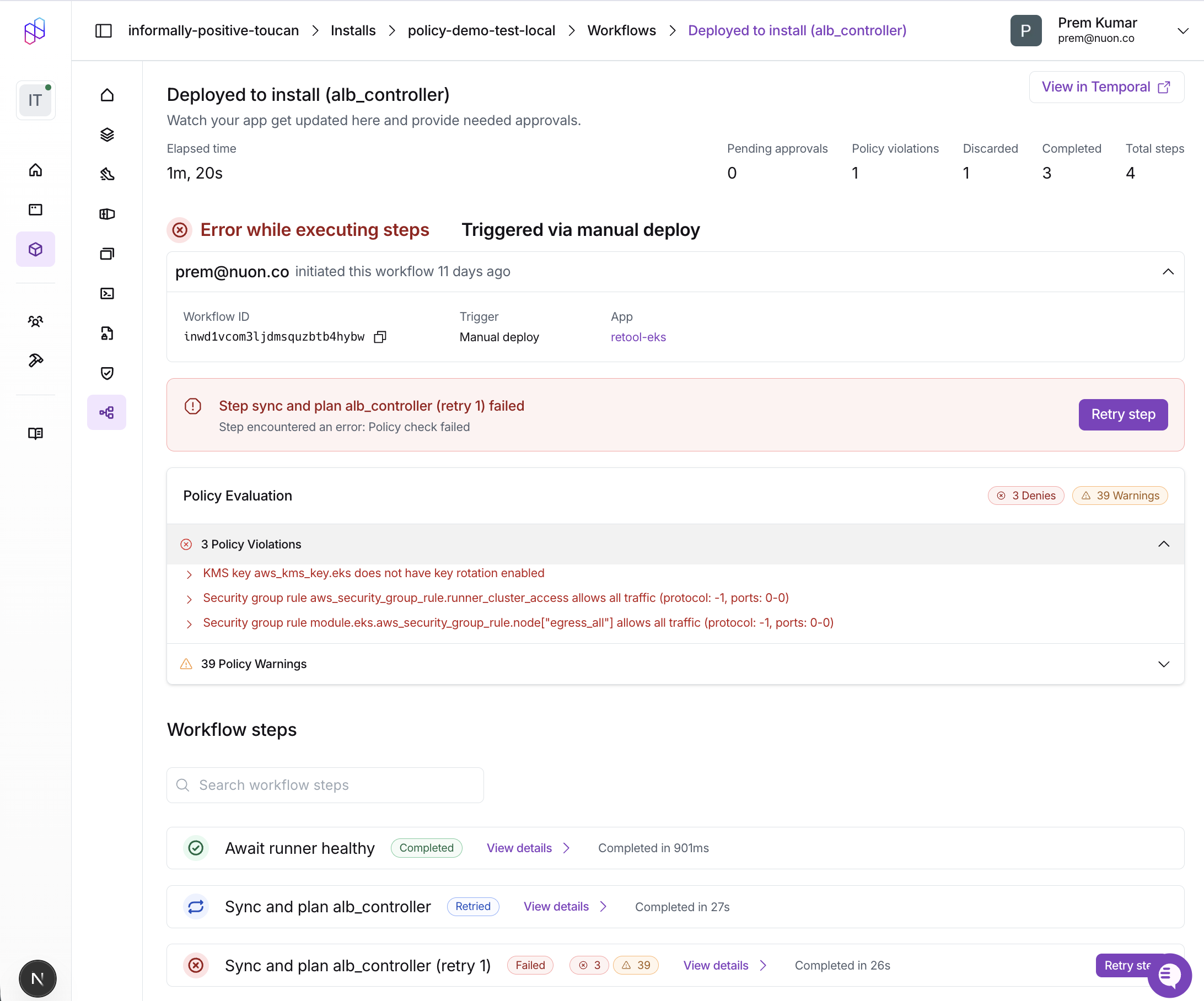 You can also view policy results via CLI using `nuon installs workflows steps get -w -s `.
## Fix Policy Violations
To resolve policy violations, update your components to comply with the policies:
**For container images**: Sign your images using [cosign](https://github.com/sigstore/cosign) or another signing tool before pushing to your registry.
**For Terraform**: Add the required configuration to your module:
```hcl theme={null}
resource "aws_s3_bucket" "backup" {
bucket = "my-backup-bucket"
tags = {
Environment = "production"
}
}
resource "aws_s3_bucket_server_side_encryption_configuration" "backup" {
bucket = aws_s3_bucket.backup.id
rule {
apply_server_side_encryption_by_default {
sse_algorithm = "AES256"
}
}
}
```
**For Helm charts**: Add resource limits to your pod specs:
```yaml theme={null}
containers:
- name: api
resources:
limits:
cpu: "500m"
memory: "512Mi"
requests:
cpu: "100m"
memory: "128Mi"
```
After making changes, sync and redeploy:
```sh theme={null}
nuon apps sync
nuon installs deploy -i
```
Confirm the policies now pass:
```
Step Status Policy
deploy-database success ✓
deploy-api success ✓
```
## Next Steps
* [External Image Policies](/guides/external-image-policies) - Advanced patterns for container image validation including SBOM, attestations, and signature verification
* [Example Policies Repository](https://github.com/nuonco/policies) - Ready-to-use policy examples for Terraform and Kubernetes
* [Policies Configuration Reference](/config-ref/policies) - Complete schema reference for policy configuration
You can also view policy results via CLI using `nuon installs workflows steps get -w -s `.
## Fix Policy Violations
To resolve policy violations, update your components to comply with the policies:
**For container images**: Sign your images using [cosign](https://github.com/sigstore/cosign) or another signing tool before pushing to your registry.
**For Terraform**: Add the required configuration to your module:
```hcl theme={null}
resource "aws_s3_bucket" "backup" {
bucket = "my-backup-bucket"
tags = {
Environment = "production"
}
}
resource "aws_s3_bucket_server_side_encryption_configuration" "backup" {
bucket = aws_s3_bucket.backup.id
rule {
apply_server_side_encryption_by_default {
sse_algorithm = "AES256"
}
}
}
```
**For Helm charts**: Add resource limits to your pod specs:
```yaml theme={null}
containers:
- name: api
resources:
limits:
cpu: "500m"
memory: "512Mi"
requests:
cpu: "100m"
memory: "128Mi"
```
After making changes, sync and redeploy:
```sh theme={null}
nuon apps sync
nuon installs deploy -i
```
Confirm the policies now pass:
```
Step Status Policy
deploy-database success ✓
deploy-api success ✓
```
## Next Steps
* [External Image Policies](/guides/external-image-policies) - Advanced patterns for container image validation including SBOM, attestations, and signature verification
* [Example Policies Repository](https://github.com/nuonco/policies) - Ready-to-use policy examples for Terraform and Kubernetes
* [Policies Configuration Reference](/config-ref/policies) - Complete schema reference for policy configuration