> ## Documentation Index
> Fetch the complete documentation index at: https://docs.nuon.co/llms.txt
> Use this file to discover all available pages before exploring further.
# Reprovision an install
> Re-run provisioning against the current app config to recreate an install's stack, sandbox, and components.
Reprovisioning triggers a full install workflow against current app config. Used when customer stack app config changes needs to be
rolled out, or, when we need to create/update the customer [stack](/concepts/stacks) resources like roles, secrets, policies, inputs etc.
Every reprovision runs as a [workflow](/concepts/workflows), so it is planned, approvable, and auditable.
## Only trigger what's needed
A **reprovision install** is the full chain: it reprovisions the stack, then the sandbox, then redeploys every
component on top. A **reprovision stack** stops at the stack, so it only updates the customer stack and its runner and
leaves the sandbox and components alone. If the change you are rolling out is stack-facing only, reprovision the stack.
| Flavor | Recreates | Runner downtime | Use when |
| -------------- | -------------------------------------------------- | --------------- | -------------------------------------------------------------------- |
| **Full** | Stack, then sandbox, then all components | Yes | The install is broken end to end, or the customer deleted resources |
| **Stack only** | Stack and runner infrastructure; sandbox untouched | Yes | The runner infrastructure was deleted, or the stack template changed |
A stack reprovision recreates the runner. Deployments and actions are unavailable until the new runner is healthy.
## Full reprovision
```sh theme={null}
nuon installs reprovision -i $INSTALL_ID
```
Open the install, choose **Settings** from install navigation panel, then **Reprovision install**. Pick an
[operation role](/concepts/operation-roles) if the install offers more than one, then confirm.
```sh theme={null}
nuon installs workflows watch -i $INSTALL_ID
```
The install's **Workflows** view shows the same run.
## Stack only
Recreates the runner and its infrastructure, leaving the sandbox alone.
```sh theme={null}
nuon installs reprovision -i $INSTALL_ID --stack-only
```
`nuon installs stacks reprovision -i $INSTALL_ID` is the same operation. In the dashboard, it is
**Settings**, then **Reprovision stack**.
Add `--skip-components` to stop once the stack is healthy instead of redeploying components:
```sh theme={null}
nuon installs reprovision -i $INSTALL_ID --stack-only --skip-components
```
`--skip-components` is only valid with `--stack-only`. The CLI rejects it on a full reprovision.
### On AWS
Nuon regenerates the stack version from the current app config before applying it, so a stack reprovision picks up
changes such as a new runner instance type. The ASG and EC2 instance are replaced. Resources the runner previously
deployed are untouched by the stack run unless changed in app config like new permission additions, in that case we recreate that resource.
### Update a CloudFormation stack
Reprovisioning generates the new template, but it does not apply it. The reprovision workflow pauses on the await
install stack step, and that step's details panel has everything the customer needs, prefilled with the install's
stack name, region, and new template URL:
* **CloudFormation template** URL, with copy and download buttons.
* **Deploy with AWS CLI**, with ready-made **Create stack** and **Update existing stack** commands.
Open the step, copy what you need, and send it to the customer. Customer needs to apply it to their existing root stack.
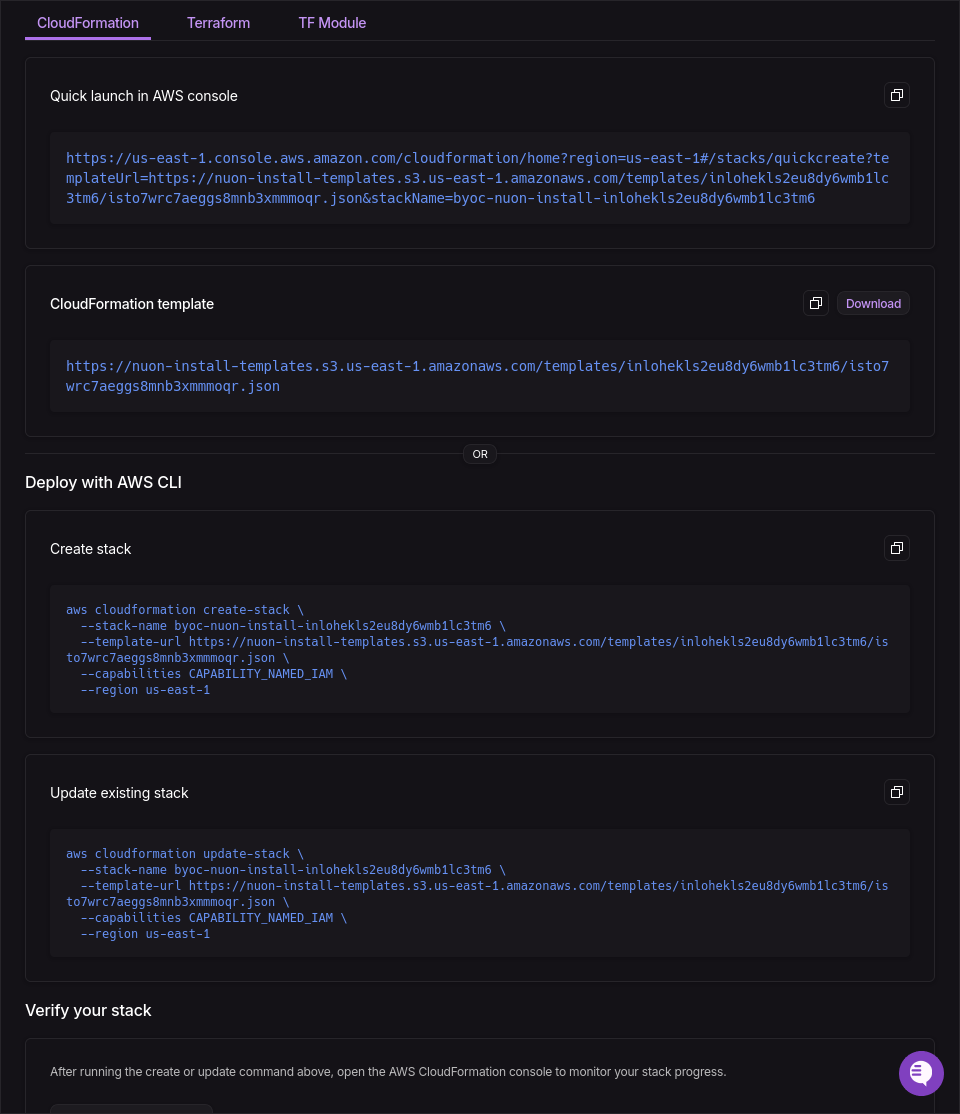 Copy the **Update existing stack** command from the step panel. It looks like this:
```sh theme={null}
aws cloudformation update-stack \
--stack-name \
--template-url \
--capabilities CAPABILITY_NAMED_IAM \
--region
```
Templates that are not served from S3 come through as a `curl` plus `--template-body file://template.json`
variant of the same command.
In the CloudFormation console, select the stack created for the install. Use the root stack, not one of its
nested stacks.
Choose **Stack actions**, then **Create change set for current stack**.
Choose **Replace existing template**, select **Amazon S3 URL**, and paste the **CloudFormation template**
link copied from the step panel.
Step through the parameters. Keep the existing values unless the reprovision introduced new inputs or secrets.
Review the listed changes, then choose **Execute change set**. CloudFormation applies the new template to the
existing stack.
### On GCP
GCP install stacks are managed with Terraform. A reprovision generates a new stack version and pauses at the **await
install stack** step until the customer applies it to the existing stack.
Keep the existing Terraform configuration and state backend. The published `nuonco/stack/gcp` module reads the
current stack configuration from Nuon during the next plan, including changes to roles and permissions.
If the reprovision introduces or removes customer inputs or secrets, update the module's `inputs` and `secrets`
maps first. Then have the customer review and apply the changes:
```sh theme={null}
terraform plan
terraform apply
```
A new stack version does not require a module upgrade. See [Updating the stack](/guides/provision-stacks-with-terraform-module#updating-the-stack)
for detailed input, secret, role, and module upgrade instructions.
Open the **Terraform** tab on the **await install stack** step and download the new `inputs.auto.tfvars` and
`secrets.auto.tfvars`. Replace those files in the existing `install-stacks/gcp` working directory, then have the
customer review and apply the changes:
```sh theme={null}
terraform plan
terraform apply
```
Both paths must use the existing state backend (typically GCS). Reusing the existing state updates the current runner
infrastructure instead of creating a separate stack. When the runner reconnects, the workflow continues.
## Hooks that fire
| Flavor | Action triggers |
| --------------------------------- | ----------------------------------------------------- |
| Full and stack only | `pre-reprovision`, `post-reprovision` |
| Sandbox leg of a full reprovision | `pre-reprovision-sandbox`, `post-reprovision-sandbox` |
`pre-reprovision` fires once the runner is healthy, not at the start of the workflow, because the stack run has to
come up first. Subscribers to the `installs` and `sandboxes` `reprovision` [webhook](/guides/webhooks) events are
notified for the same runs.
## When to reach for it
* The customer deleted the runner infrastructure or other stack resources.
* A [secret or input](/guides/configuring-inputs-and-secrets) changed and redeploying individual components is not
enough.
* The runner reports that the install stack version has expired.
* Additions / modifications of roles, permissions, inputs in app config.
## See also
* [App and install life cycle](/guides/app-install-life-cycle)
* [Customer-controlled runner shutdown](/guides/runner-kill-switch)
* [Operation roles](/concepts/operation-roles)
* [Configure policies](/guides/configuring-policies)
Copy the **Update existing stack** command from the step panel. It looks like this:
```sh theme={null}
aws cloudformation update-stack \
--stack-name \
--template-url \
--capabilities CAPABILITY_NAMED_IAM \
--region
```
Templates that are not served from S3 come through as a `curl` plus `--template-body file://template.json`
variant of the same command.
In the CloudFormation console, select the stack created for the install. Use the root stack, not one of its
nested stacks.
Choose **Stack actions**, then **Create change set for current stack**.
Choose **Replace existing template**, select **Amazon S3 URL**, and paste the **CloudFormation template**
link copied from the step panel.
Step through the parameters. Keep the existing values unless the reprovision introduced new inputs or secrets.
Review the listed changes, then choose **Execute change set**. CloudFormation applies the new template to the
existing stack.
### On GCP
GCP install stacks are managed with Terraform. A reprovision generates a new stack version and pauses at the **await
install stack** step until the customer applies it to the existing stack.
Keep the existing Terraform configuration and state backend. The published `nuonco/stack/gcp` module reads the
current stack configuration from Nuon during the next plan, including changes to roles and permissions.
If the reprovision introduces or removes customer inputs or secrets, update the module's `inputs` and `secrets`
maps first. Then have the customer review and apply the changes:
```sh theme={null}
terraform plan
terraform apply
```
A new stack version does not require a module upgrade. See [Updating the stack](/guides/provision-stacks-with-terraform-module#updating-the-stack)
for detailed input, secret, role, and module upgrade instructions.
Open the **Terraform** tab on the **await install stack** step and download the new `inputs.auto.tfvars` and
`secrets.auto.tfvars`. Replace those files in the existing `install-stacks/gcp` working directory, then have the
customer review and apply the changes:
```sh theme={null}
terraform plan
terraform apply
```
Both paths must use the existing state backend (typically GCS). Reusing the existing state updates the current runner
infrastructure instead of creating a separate stack. When the runner reconnects, the workflow continues.
## Hooks that fire
| Flavor | Action triggers |
| --------------------------------- | ----------------------------------------------------- |
| Full and stack only | `pre-reprovision`, `post-reprovision` |
| Sandbox leg of a full reprovision | `pre-reprovision-sandbox`, `post-reprovision-sandbox` |
`pre-reprovision` fires once the runner is healthy, not at the start of the workflow, because the stack run has to
come up first. Subscribers to the `installs` and `sandboxes` `reprovision` [webhook](/guides/webhooks) events are
notified for the same runs.
## When to reach for it
* The customer deleted the runner infrastructure or other stack resources.
* A [secret or input](/guides/configuring-inputs-and-secrets) changed and redeploying individual components is not
enough.
* The runner reports that the install stack version has expired.
* Additions / modifications of roles, permissions, inputs in app config.
## See also
* [App and install life cycle](/guides/app-install-life-cycle)
* [Customer-controlled runner shutdown](/guides/runner-kill-switch)
* [Operation roles](/concepts/operation-roles)
* [Configure policies](/guides/configuring-policies)