> ## Documentation Index
> Fetch the complete documentation index at: https://docs.nuon.co/llms.txt
> Use this file to discover all available pages before exploring further.
# Configure runbooks
> Define named, multi-step procedures and run them against your installs on demand.
Runbooks turn a multi-step operational procedure into a single, repeatable artifact you run against an install on demand. Define the sequence once; run it consistently across every install instead of doing it by hand each time.
Common uses:
* version upgrades
* database migrations
* data backfills
* recovery steps
Each step has a `type` that determines what it does:
* **`component_deploy`** — Deploy a component. Set `deploy_dependents` to also roll out the component's downstream dependents, in dependency order. (`deploy` is accepted as a legacy alias.)
* **`component_tear_down`** — Tear down a component. Set `tear_down_dependents` to also tear down its downstream dependents, with dependents removed first.
* **`action`** — Run an existing [action](/guides/actions), or an inline command or script defined directly on the step.
* **`sandbox_reprovision`** — Reprovision the install's sandbox infrastructure. Set `skip_component_deploys` to reprovision the infrastructure only, without redeploying components on top.
* **`sandbox_deprovision`** — Deprovision the install's sandbox infrastructure.
Steps run in order, and every run is recorded in the install's workflow history: a durable, auditable record of what ran, when, and against which install.
## Where runbooks live
Define runbooks as TOML files in a `runbooks/` directory in your app config. Each file is one runbook:
```
my-app/
├── metadata.toml
├── components/
├── actions/
└── runbooks/
└── v2.3-update.toml
```
They sync with the rest of your config via `nuon apps sync`, run from the app's working directory in your terminal. Whenever you edit a runbook file locally, re-run `nuon apps sync` to push the changes to Nuon.
## Example
```toml theme={null}
name = "v2.3-update"
description = "Apply the v2.3 schema migration, then roll out the API."
readme = "./runbooks/v2.3-update.md"
[[steps]]
name = "migrate-db"
type = "action"
action_name = "database-migration"
[[steps]]
name = "deploy-api"
type = "component_deploy"
component_name = "api-server"
deploy_dependents = true
[[steps]]
name = "smoke-test"
type = "action"
command = "./scripts/smoke-test.sh"
timeout = "5m"
```
## Configuration reference
### Runbook
| Field | Type | Required | Description |
| ------------- | ------ | -------- | ----------------------------------------------------------------------------------------------------------------------------- |
| `name` | string | Yes | Name shown in the **Runbooks** tab and used to identify the runbook during sync. |
| `description` | string | No | Short description of what the runbook does. |
| `readme` | string | No | Markdown documentation for the runbook. Supports Go templating and external file sources (HTTP(S) URLs, git, or local paths). |
| `labels` | map | No | Key/value labels for organizing runbooks. |
| `steps` | array | Yes | Ordered list of steps to execute. See below. |
### Step
| Field | Type | Required | Description |
| ------------------------ | ------ | --------------- | --------------------------------------------------------------------------------------------------------------------------------------------------------------------- |
| `name` | string | Yes | Step name shown in the workflow UI and runbook detail page. |
| `type` | string | Yes | `component_deploy`, `component_tear_down`, `action`, `sandbox_reprovision`, or `sandbox_deprovision`. `deploy` is accepted as a legacy alias. |
| `component_name` | string | component steps | Component to deploy or tear down. Required when `type = "component_deploy"` or `"component_tear_down"`. |
| `deploy_dependents` | bool | No | When true, also deploys the component's transitive dependents (downstream subgraph) in dependency order. Only applies to `component_deploy` steps. |
| `tear_down_dependents` | bool | No | When true, also tears down the component's transitive dependents (downstream subgraph), with dependents torn down first. Only applies to `component_tear_down` steps. |
| `skip_component_deploys` | bool | No | When true, only the sandbox infrastructure is reprovisioned; components are not redeployed on top. Only applies to `sandbox_reprovision` steps. |
| `action_name` | string | action steps | Name of an existing [action](/guides/actions) to run. Mutually exclusive with the inline fields below. |
| `command` | string | action steps | Shell command for an inline action. Supports Go templating. |
| `inline_contents` | string | action steps | Inline script contents, or a reference to an external file. Supports templating and external sources. |
| `env_vars` | map | No | Environment variables for an inline action step. |
| `timeout` | string | No | Maximum execution time for an inline action step (Go duration, e.g. `30s`, `5m`). |
| `role` | string | No | IAM role to assume when executing an inline action step. |
An action step uses **either** `action_name` (to run a previously defined action) **or** the inline fields (`command` / `inline_contents`) to define an inline action, not both.
## Triggering a runbook
Trigger and watch runs from the **Runbooks** tab in the [dashboard](https://app.nuon.co/), or from the CLI:
```sh theme={null}
# list the runbooks available on an install
nuon runbooks list --install-id
```
Each run is recorded in the install's workflow history, so you can review the steps, logs, and outcome of any past runbook execution.
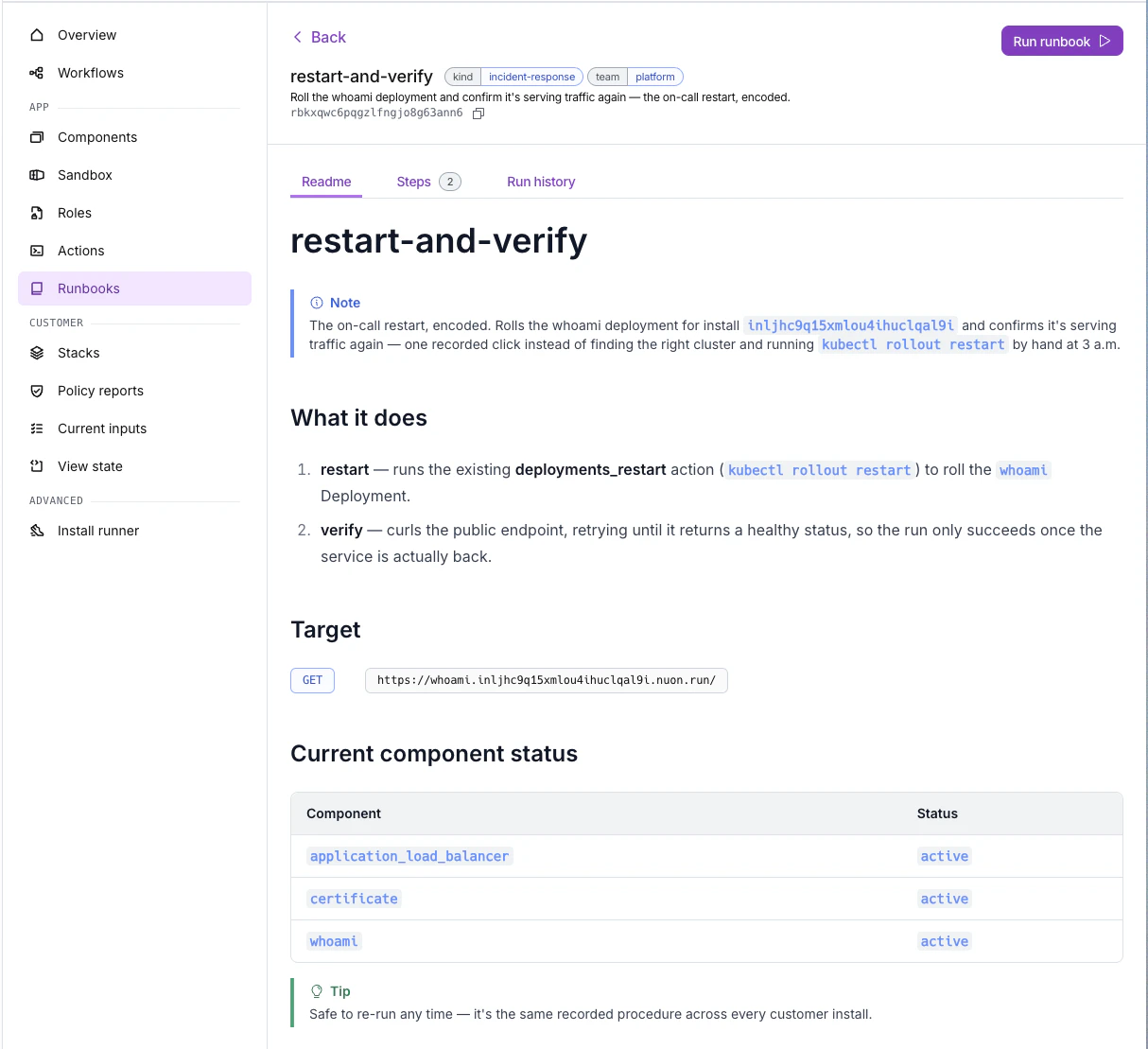
## A complete example
For a runnable example, see the [`programmable-runbook-and-readme`](https://github.com/nuonco/example-app-configs/tree/main/programmable-runbook-and-readme) app config in `example-app-configs`. It has runbooks for an on-call restart and a smoke test, plus rendered READMEs that embed them.