> ## Documentation Index
> Fetch the complete documentation index at: https://docs.nuon.co/llms.txt
> Use this file to discover all available pages before exploring further.
# Customer-Controlled Runner Shutdown
> How customers can pause or permanently stop the Nuon Runner from their own AWS account.
The runner is managed via the stack, and is responsible for all actions. While you can also remove permissions, you can also entirely disable the runner. This is useful for partial-airgapped installs, release windows and customers who want more control.
## How It Works
The Runner is created by the customer's [Stack](/concepts/stacks) during install provisioning. The customer has full ownership of this ASG in their AWS account. By changing the ASG capacity settings, the customer controls whether the Runner is up.
| Approach | Method | Reversibility | Use case |
| --------------------------- | ------------------------- | ------------------------------------------------------------- | --------------------------------------------------------------------- |
| **Soft kill** (recommended) | Set ASG capacity to 0/0/0 | Set back to 1/1/1 to restore | Temporary pause during audit, incident response, or compliance review |
| **Hard kill** | Delete the ASG entirely | Must reprovision from scratch via `nuon installs reprovision` | Permanent removal or vendor offboarding |
## Soft Kill: Scale the ASG to Zero
This is the recommended approach for temporarily pausing the Runner. It gracefully terminates the EC2 instance without destroying any ASG configuration.
### Steps
1. Open the **EC2 Console** in the AWS account where the install is provisioned.
2. Navigate to **Auto Scaling Groups** in the left sidebar.
3. Select the Runner's ASG (named after the install).
4. Choose **Edit** on the **Group details** panel.
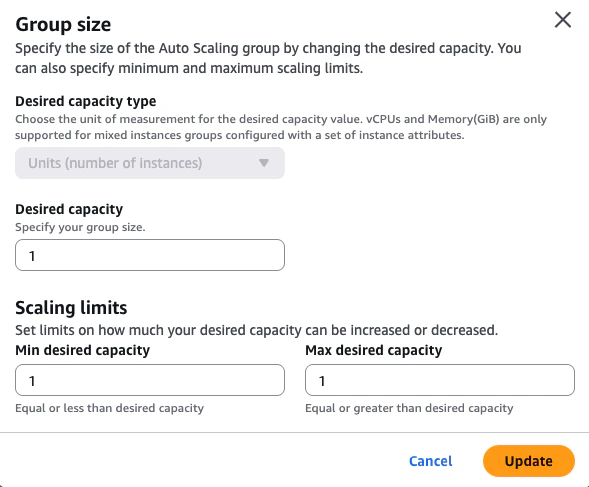
5. Set all three capacity fields to **0**:
* **Desired capacity**: 0
* **Min desired capacity**: 0
* **Max desired capacity**: 0
6. Click **Update**.
 The Runner EC2 instance will be terminated within a few minutes. While scaled to zero:
* No deployments, updates, or actions can be executed against this install.
* The vendor cannot reprovision the Runner — `nuon installs reprovision` will fail.
* All existing infrastructure deployed by the Runner remains untouched.
### Restoring the Runner
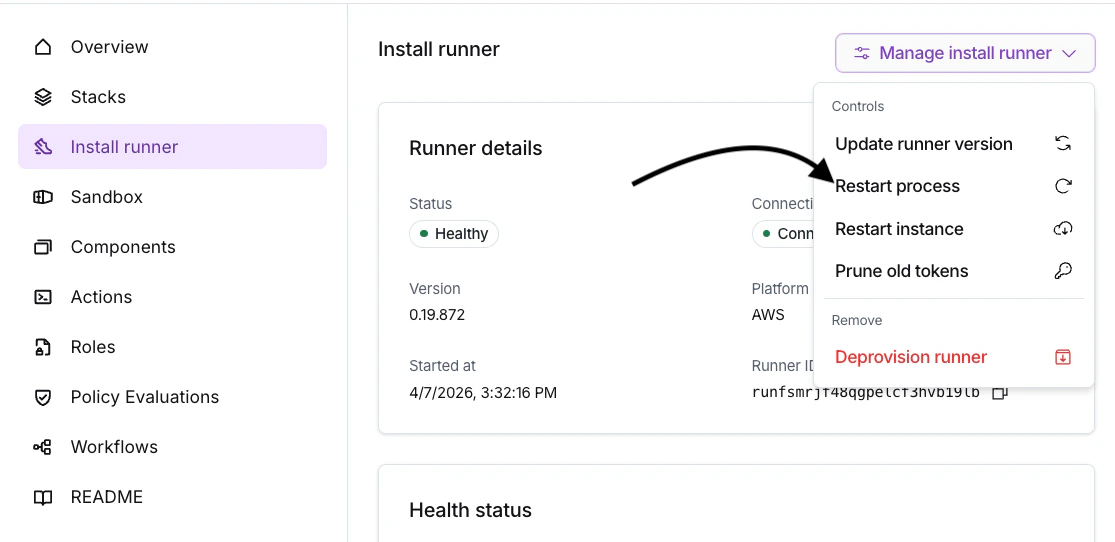
To resume normal operation, edit the ASG and set the capacity back to **1/1/1** (Desired: 1, Min: 1, Max: 1). The Runner will restart if you navigate to the Install's Runner and choose **Restart process** on the Runner.
The Runner EC2 instance will be terminated within a few minutes. While scaled to zero:
* No deployments, updates, or actions can be executed against this install.
* The vendor cannot reprovision the Runner — `nuon installs reprovision` will fail.
* All existing infrastructure deployed by the Runner remains untouched.
### Restoring the Runner
To resume normal operation, edit the ASG and set the capacity back to **1/1/1** (Desired: 1, Min: 1, Max: 1). The Runner will restart if you navigate to the Install's Runner and choose **Restart process** on the Runner.
 ## Hard Kill: Delete the ASG
For permanent removal (e.g., offboarding a vendor), the customer can delete the ASG entirely from the AWS Console or CLI. This removes the Runner and its launch configuration.
To restore after a hard kill, the vendor must reprovision the install:
```bash theme={null}
nuon installs reprovision
```
This recreates the ASG and Runner from the Stack definition.
## Additional Lockdown Options
For even more granular control over what the Runner can do, Nuon supports [Policies](/concepts/policies#policies) that let you define approval gates, scoping rules, and conditions on deployments and actions. Policies can be combined with the ASG kill switch for defense-in-depth.
## Related Resources
* [Runner Management Mode](/guides/runner-management-mode) — Configure how the Runner process is managed within the EC2 instance.
* [Nuon Security & Trust](/guides/vendor-customers) — Overview of Nuon's security model and how to communicate it to customers.
* [Customer Cloud Permissions](/guides/vendor-customers#customer-cloud-permissions) — How IAM roles scope what the Runner can do.
* [Security Architecture](/security) — Technical overview of Nuon's security properties.
## Hard Kill: Delete the ASG
For permanent removal (e.g., offboarding a vendor), the customer can delete the ASG entirely from the AWS Console or CLI. This removes the Runner and its launch configuration.
To restore after a hard kill, the vendor must reprovision the install:
```bash theme={null}
nuon installs reprovision
```
This recreates the ASG and Runner from the Stack definition.
## Additional Lockdown Options
For even more granular control over what the Runner can do, Nuon supports [Policies](/concepts/policies#policies) that let you define approval gates, scoping rules, and conditions on deployments and actions. Policies can be combined with the ASG kill switch for defense-in-depth.
## Related Resources
* [Runner Management Mode](/guides/runner-management-mode) — Configure how the Runner process is managed within the EC2 instance.
* [Nuon Security & Trust](/guides/vendor-customers) — Overview of Nuon's security model and how to communicate it to customers.
* [Customer Cloud Permissions](/guides/vendor-customers#customer-cloud-permissions) — How IAM roles scope what the Runner can do.
* [Security Architecture](/security) — Technical overview of Nuon's security properties.