> ## Documentation Index
> Fetch the complete documentation index at: https://docs.nuon.co/llms.txt
> Use this file to discover all available pages before exploring further.
# 042 - BYOC Telemetry, Improved UI and Deprovisioning
> OTEL support for BYOC environments, and platform usability improvements
*October 15, 2026*
## BYOC telemetry
Every install's logs, metrics, and traces in your backend.
* Apps send OpenTelemetry to a private OTLP endpoint in each install
* The runner forwards it to your relay, which exports to any OTLP backend
* Records are stamped with verified `nuon.org.id`, `nuon.app.id`, and `nuon.install.id`
* No backend credentials in customer accounts
* Customers can disable the endpoint in their stack
* Org default plus per-install overrides
```toml theme={null}
OTEL_EXPORTER_OTLP_PROTOCOL = "http/protobuf"
OTEL_EXPORTER_OTLP_ENDPOINT = "{{ .nuon.install_stack.outputs.telemetry_endpoint }}"
```
***
## Improved UI
Track rollouts and changes across every install.
* App branches are each app's landing page
* Install pages show commits behind the tracked branch
* Active deployments listed above history
* Actions, runbooks, and deployments record who triggered them
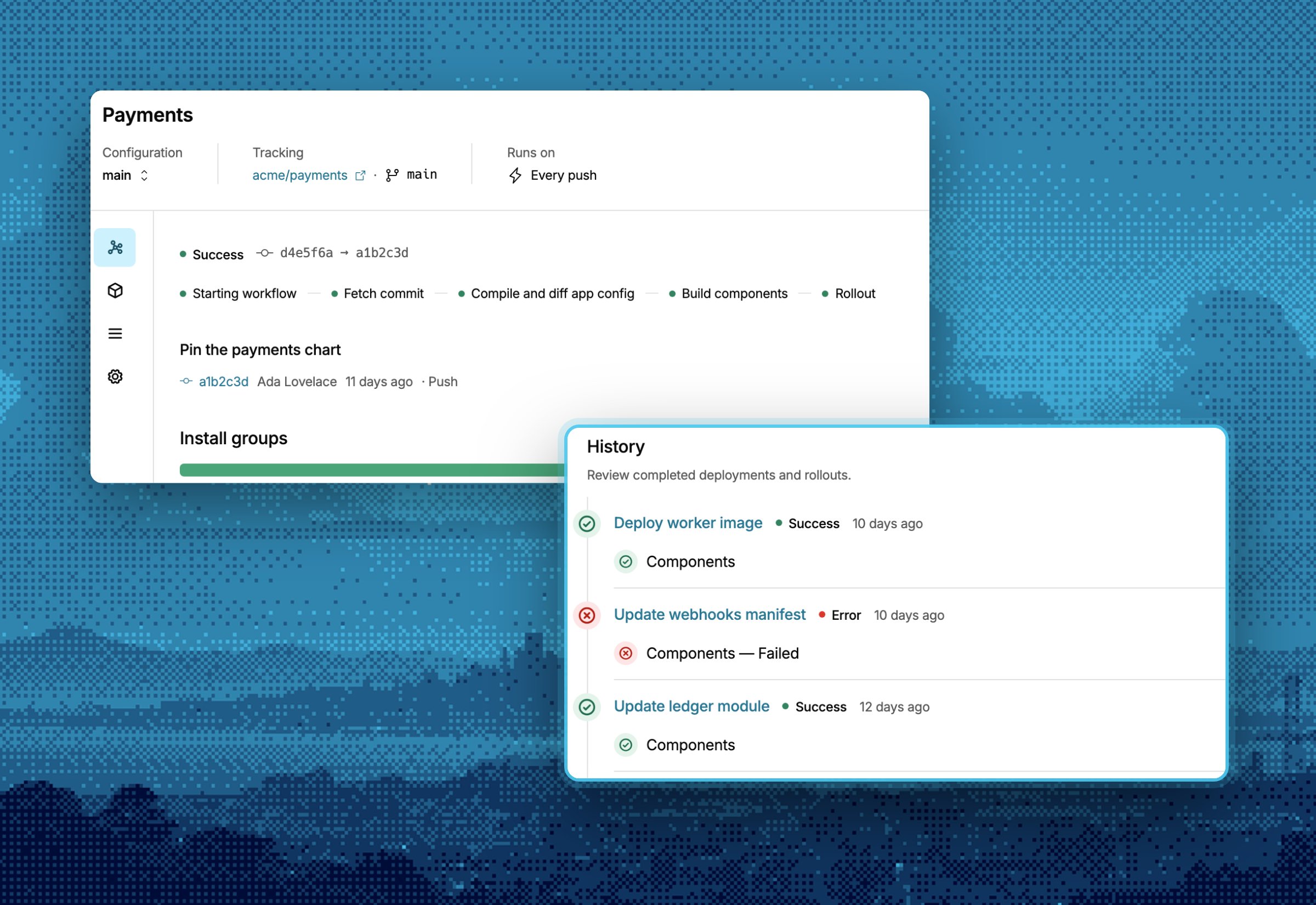 Rolling out now. Ask us in your shared Slack channel to turn it on.
***
## Deprovisioning
Choose what stays in the customer's account on teardown.
* `[teardown] retain` removes listed resources from state and leaves them running
* The teardown plan marks each retained resource with a **Retain** action
* The plan fails if a retained resource depends on something being destroyed
* `apply_on_teardown = false` skips a policy during teardowns and keeps it on for deploys
* Failed plan steps can be skipped
* Deprovisions show on the install's deployments page
```toml components/database.toml theme={null}
[teardown]
retain = [
"aws_rds_cluster.main",
"aws_rds_cluster_instance.main",
]
```
```toml policies.toml theme={null}
[[policy]]
type = "terraform_module"
engine = "opa"
contents = "./protect-rds-cluster.rego"
apply_on_teardown = false
```
***
## Other updates in this release
### Scheduled runbooks
Runbooks can run on a cron schedule.
```toml theme={null}
[[triggers]]
type = "cron"
cron_schedule = "0 6 * * 1"
```
### AWS cloud connections
AWS access through short-lived OIDC credentials. Select a connection when creating an install.
This documentation is built and hosted on [Mintlify](https://mintlify.com), a developer documentation platform.
Rolling out now. Ask us in your shared Slack channel to turn it on.
***
## Deprovisioning
Choose what stays in the customer's account on teardown.
* `[teardown] retain` removes listed resources from state and leaves them running
* The teardown plan marks each retained resource with a **Retain** action
* The plan fails if a retained resource depends on something being destroyed
* `apply_on_teardown = false` skips a policy during teardowns and keeps it on for deploys
* Failed plan steps can be skipped
* Deprovisions show on the install's deployments page
```toml components/database.toml theme={null}
[teardown]
retain = [
"aws_rds_cluster.main",
"aws_rds_cluster_instance.main",
]
```
```toml policies.toml theme={null}
[[policy]]
type = "terraform_module"
engine = "opa"
contents = "./protect-rds-cluster.rego"
apply_on_teardown = false
```
***
## Other updates in this release
### Scheduled runbooks
Runbooks can run on a cron schedule.
```toml theme={null}
[[triggers]]
type = "cron"
cron_schedule = "0 6 * * 1"
```
### AWS cloud connections
AWS access through short-lived OIDC credentials. Select a connection when creating an install.
This documentation is built and hosted on [Mintlify](https://mintlify.com), a developer documentation platform.