

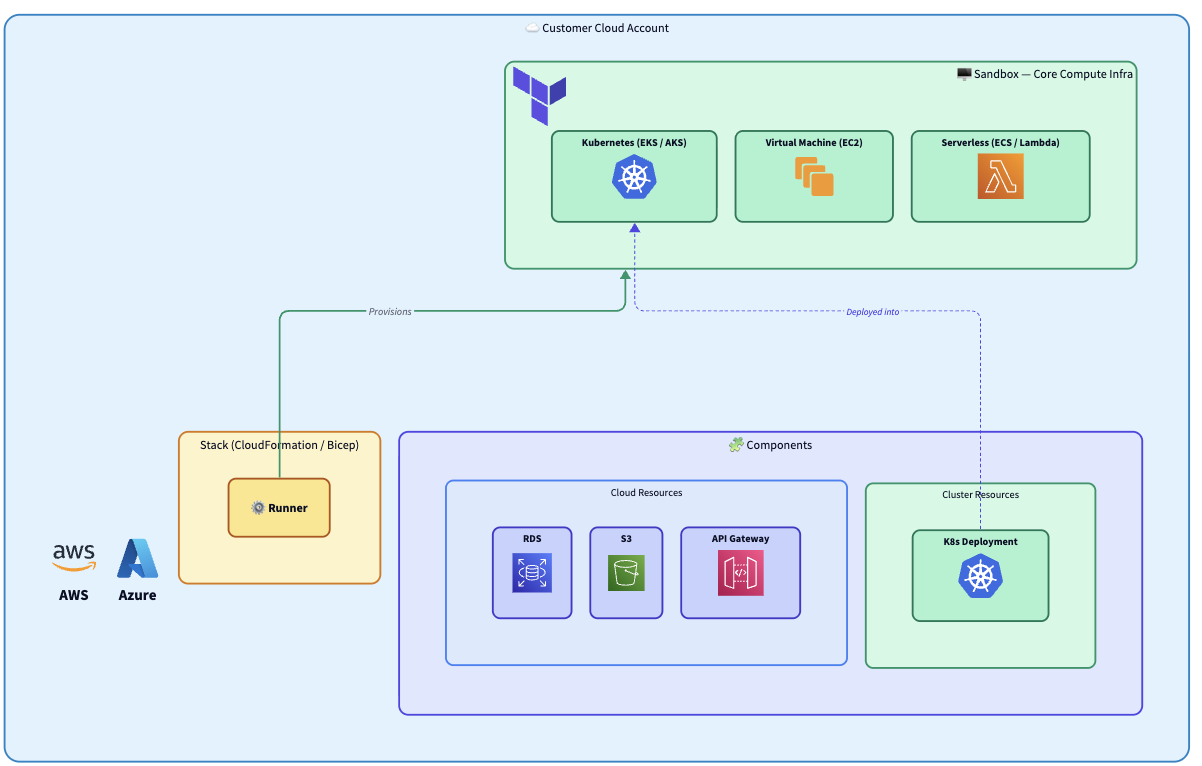
- Cloud Account - the customer’s AWS account or Azure subscription. Everything Nuon deploys lives inside it. No cross-account access is required.
- Stack - an infrastructure template that provisions networking and the Runner. Nuon generates both a Terraform version and the platform’s native IaC version (CloudFormation on AWS, Azure Resource Manager (Bicep) on Azure; on GCP, only Terraform is generated since Infrastructure Manager is Terraform-native). The customer deploys whichever format fits their tooling, using their own credentials.
- Runner - picks up jobs from the Control Plane and executes all infrastructure operations locally inside the customer’s environment.
- Sandbox - the base compute infrastructure (Kubernetes, VMs, serverless) provisioned by the Runner.
- Components - your application (Helm charts, Terraform modules, manifests, container images) deployed on top of the Sandbox.