

When you deploy your app through Nuon, it runs inside your customer’s cloud account, not yours. Nuon makes this possible by layering infrastructure and execution components inside the customer’s environment, all orchestrated remotely by the Nuon Control Plane. Each deployment is called an Install.Documentation Index
Fetch the complete documentation index at: https://docs.nuon.co/llms.txt
Use this file to discover all available pages before exploring further.
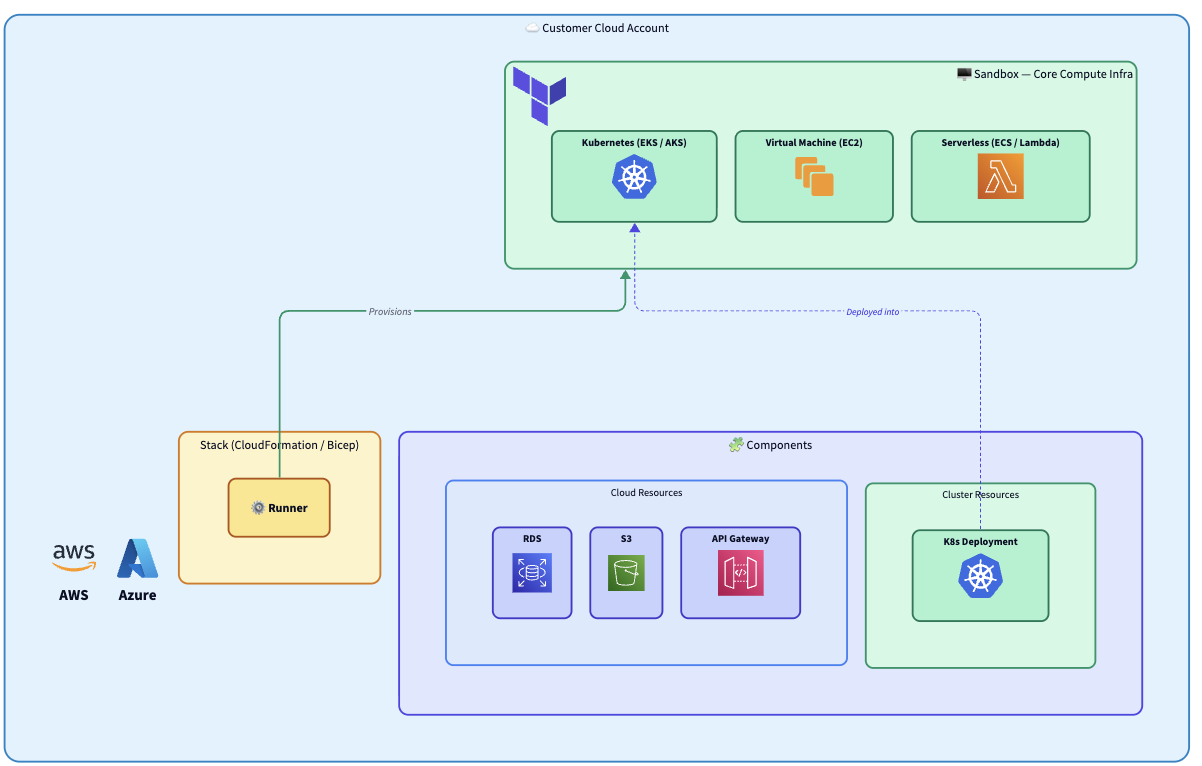
- Cloud Account - the customer’s AWS account or Azure subscription. Everything Nuon deploys lives inside it. No cross-account access is required.
- Stack - a CloudFormation, Azure Resource Manager (Bicep), or Terraform template that provisions networking and the Runner. The customer deploys it using their own credentials.
- Runner - picks up jobs from the Control Plane and executes all infrastructure operations locally inside the customer’s environment.
- Sandbox - the base compute infrastructure (Kubernetes, VMs, serverless) provisioned by the Runner.
- Components - your application (Helm charts, Terraform modules, manifests, container images) deployed on top of the Sandbox.