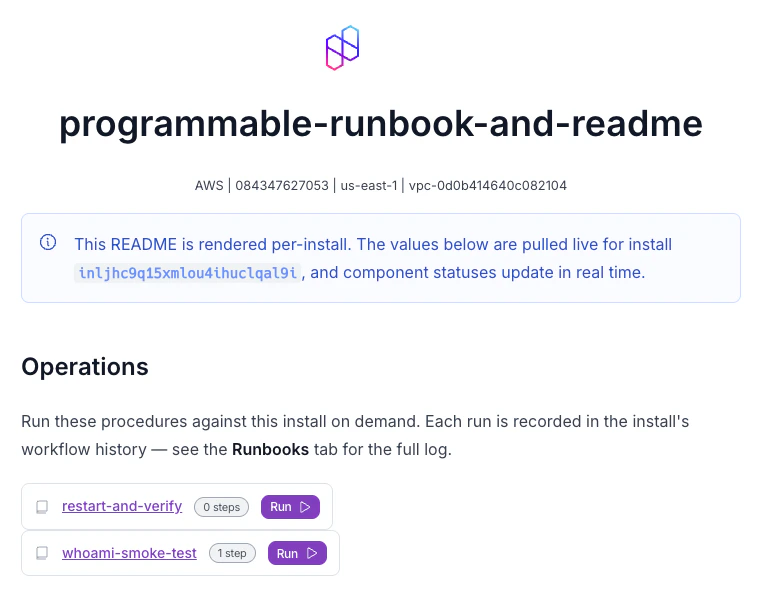
A per-install README rendered in the dashboard, with runnable runbooks
For static formatting, see Using READMEs.

Variables

READMEs support variables, rendered server-side per install (the same as component and action fields). Use them to surface install info and keep the README in sync with the app:
metadata.toml
# metadata
name = "My App"
readme = """
# {{.nuon.app.name}}

This is the README for {{.nuon.app.name}} in install {{.nuon.install.name}}.

## Sandbox

This app uses the {{.nuon.sandbox.type}} sandbox.

## Components

This app consists of the following components.

- api
- deployment

Variables use Go templating, so you get conditionals, ranges, and functions. Here, live component statuses:
metadata.toml
# metadata
name = "My App"
readme = """
# {{.nuon.app.name}}

This is the README for {{.nuon.app.name}} in install {{.nuon.install.name}}.

## Sandbox

This app uses the {{.nuon.sandbox.type}} sandbox.

## Components

{{ if .nuon.components }}

This install is running the following app components.

| Name | Status |
|------|------|
{{- range $name, $component := .nuon.components }}
| `{{ $name }}` | `{{ $component.status }}` |
{{- end }}

{{ else }}

__No app components are active in this install. You may need to run "Deploy Components" for this install.__

{{ end }}

The dashboard polls the control plane, so component statuses update in near-real-time.
.nuon.components is a map keyed by component name. Iterate it directly with range. Each value carries that component’s fields (status, outputs, etc.). Unlike .nuon.sandbox or .nuon.install_stack, it has no top-level populated flag, so use {{ if .nuon.components }} to check whether any components exist.

Live data components

These <nuon-*> tags render live install data from the dashboard. They require install context. When viewed at the app level (before selecting an install), they render as inline code showing the raw tag.

Config graph

Shows the install’s dependency graph of components and infrastructure.
README.md
<nuon-config-graph></nuon-config-graph>

View state

Renders a button that opens the install state viewer.
README.md
<nuon-view-state></nuon-view-state>

Runner card

Shows the status card for the install’s runner.
README.md
<nuon-runner-card></nuon-runner-card>

Sandbox card

Shows the status card for the install’s sandbox.
README.md
<nuon-sandbox-card></nuon-sandbox-card>

Component card

Shows the status card for a specific component. Reference by name or id.
README.md
<nuon-component-card name="api-server"></nuon-component-card>
<nuon-component-card name="ingress-nginx"></nuon-component-card>
Attributes: name, id.

Stack card

Shows the status card for the install’s stack (grouped deploy history).
README.md
<nuon-stack-card></nuon-stack-card>

Action card

Shows the status card for a specific action. Reference by name or id.
README.md
<nuon-action-card name="deploy-canary"></nuon-action-card>
<nuon-action-card name="rollback"></nuon-action-card>
Attributes: name, id.

Run runbook

Renders a card with a button that opens the run runbook confirmation modal. Reference a runbook by name or id.
README.md
<nuon-run-runbook name="restart-service"></nuon-run-runbook>
<nuon-run-runbook name="health-check"></nuon-run-runbook>
The card shows the runbook name (linked to its detail page), the number of steps, and a run button. Clicking the button opens a confirmation modal listing the steps before executing. Attributes: name, id.
Live data components are most useful in the referenced README.md file format, where you can build rich install dashboards combining live status cards with documentation.

A complete example

For a runnable example, see the programmable-runbook-and-readme app config in example-app-configs. It has a per-install app README plus runbook READMEs that render live values and embed runnable runbooks.