

Only trigger what’s needed
A reprovision install is the full chain: it reprovisions the stack, then the sandbox, then redeploys every component on top. A reprovision stack stops at the stack, so it only updates the customer stack and its runner and leaves the sandbox and components alone. If the change you are rolling out is stack-facing only, reprovision the stack.Full reprovision
1
Trigger it
- CLI
- Dashboard
2
Watch the workflow
Stack only
Recreates the runner and its infrastructure, leaving the sandbox alone.nuon installs stacks reprovision -i $INSTALL_ID is the same operation. In the dashboard, it is
Settings, then Reprovision stack. Components are never redeployed by a stack
reprovision — use a full reprovision when you also want the sandbox and components rebuilt.
On AWS
Nuon regenerates the stack version from the current app config before applying it, so a stack reprovision picks up changes such as a new runner instance type. The ASG and EC2 instance are replaced. Resources the runner previously deployed are untouched by the stack run unless changed in app config like new permission additions, in that case we recreate that resource.Update a CloudFormation stack
Reprovisioning generates the new template, but it does not apply it. The reprovision workflow pauses on the await install stack step, and that step’s details panel has everything the customer needs, prefilled with the install’s stack name, region, and new template URL:- CloudFormation template URL, with copy and download buttons.
- Deploy with AWS CLI, with ready-made Create stack and Update existing stack commands.
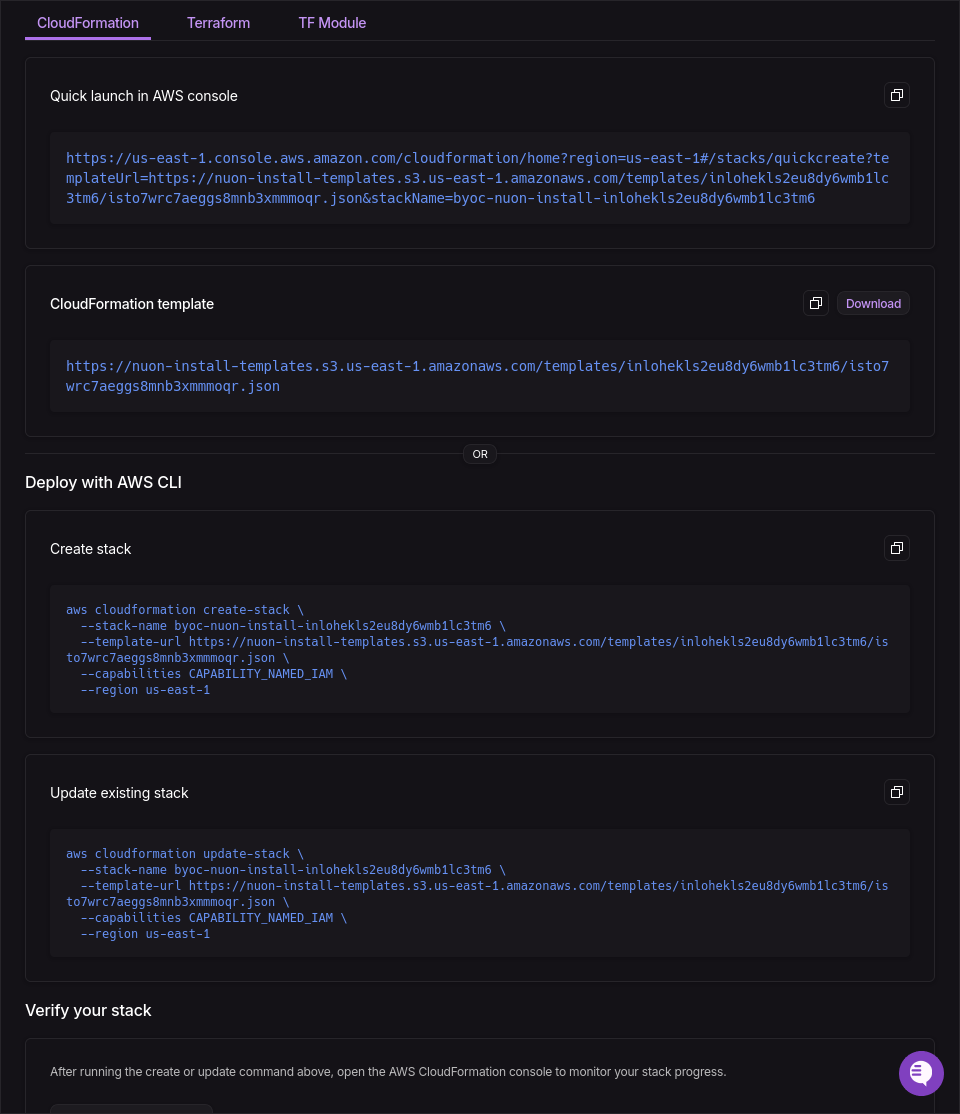
The await install stack step panel on a reprovision, with the regenerated template URL and prefilled create and update commands.
- AWS CLI
- CloudFormation console
Copy the Update existing stack command from the step panel. It looks like this:Templates that are not served from S3 come through as a
curl plus --template-body file://template.json
variant of the same command.On GCP
GCP install stacks are managed with Terraform. A reprovision generates a new stack version and pauses at the await install stack step until the customer applies it to the existing stack.- Terraform module
- Generated tfvars
Keep the existing Terraform configuration and state backend. The published A new stack version does not require a module upgrade. See Updating the stack
for detailed input, secret, role, and module upgrade instructions.
nuonco/stack/gcp module reads the
current stack configuration from Nuon during the next plan, including changes to roles and permissions.If the reprovision introduces or removes customer inputs or secrets, update the module’s inputs and secrets
maps first. Then have the customer review and apply the changes:Hooks that fire
pre-reprovision fires once the runner is healthy, not at the start of the workflow, because the stack run has to
come up first. Subscribers to the installs and sandboxes reprovision webhook events are
notified for the same runs.
When to reach for it
- The customer deleted the runner infrastructure or other stack resources.
- A secret or input changed and redeploying individual components is not enough.
- The runner reports that the install stack version has expired.
- Additions / modifications of roles, permissions, inputs in app config.