August 5, 2026

App Branches

App branches connect one git branch to your app. Push to that branch and Nuon fetches the config at that commit, rebuilds what changed, and rolls the new version out across your customer installs, in an order you define, with a plan and an approval gate in front of every group.
Declare it in a branch.toml at the root of your app config:
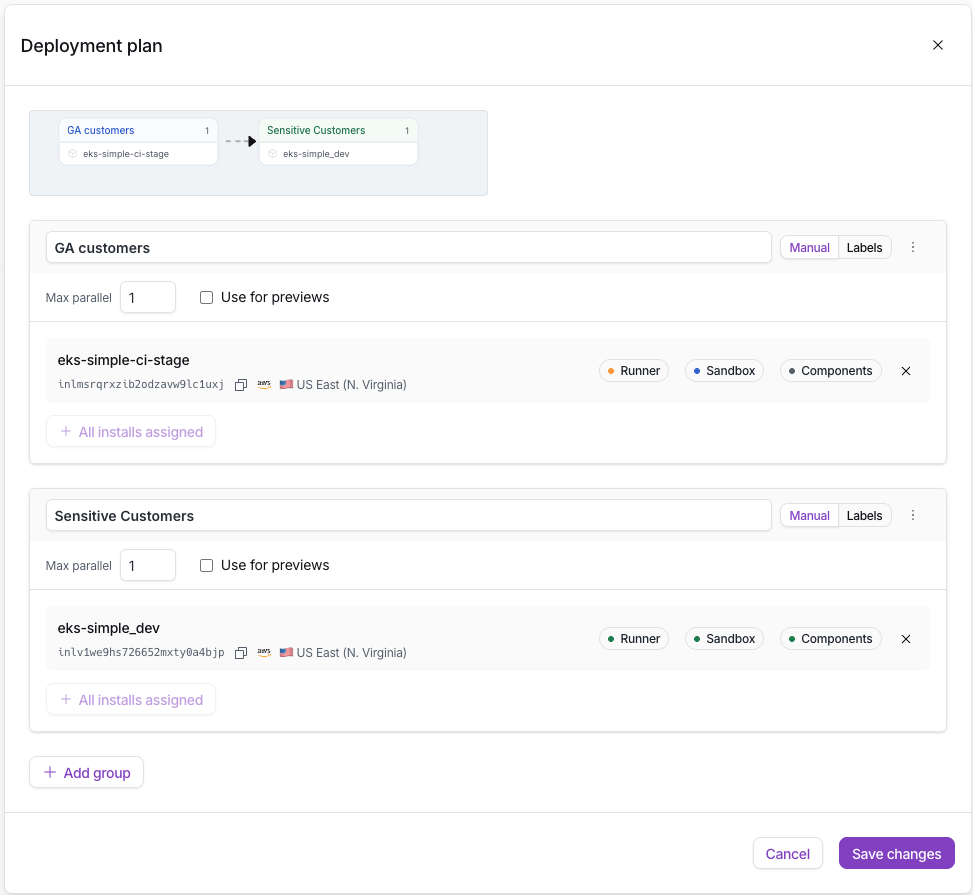
A deployment group is a named subset of installs that updates as a unit (membership by label selector or explicit list), and groups run in the order you declare. Each group plans first, then waits for your approval, and any group can be skipped. Open a pull request against the tracked branch and Nuon posts a plan-only preview of the config diff on the pull request itself. And every config change to an install is now recorded as a version, with diffs between any two, and any earlier version can be applied again.
The deployment plan editor in the Nuon dashboard: a 'GA customers' group flowing into a 'Sensitive Customers' group, each with its installs, max parallel setting, and manual or label-based membership
Start with the walkthrough, which adds a branch to the eks-simple example app end to end. The guide covers day-to-day operation, branch.toml is fully documented in the config reference, and the new nuon apps branches and nuon installs labels commands are in the CLI reference.

Other updates in this release

Read-only role

  • A new org_read_only role grants visibility into an org’s apps, installs, and workflows without the ability to change anything.
  • Assign it to members and service accounts when someone needs to observe a fleet, not operate it.
  • Set and update org member roles from the dashboard or the CLI: nuon roles list, nuon orgs update-user-role.

A more consistent installs CLI

  • nuon installs is reorganized into a consistent sub-command hierarchy: related commands nest under nuon installs components, nuon installs actions, and friends instead of compound top-level names.
  • Command output is more predictable across the group.